


 Login
 Blog
Computer Vision for Co-Packers: Counting Kits, Displays and Hand Work

In short: computer vision for co-packers is most useful where hand work and frequent changeovers leave no trusted count: kitting benches, display trays, promo bundles and rework. A camera counts those finished units, while machine lines keep their own signals.
- Count hand-built kits, shippers and display trays at one fixed spot, and check the camera count against a hand count first.
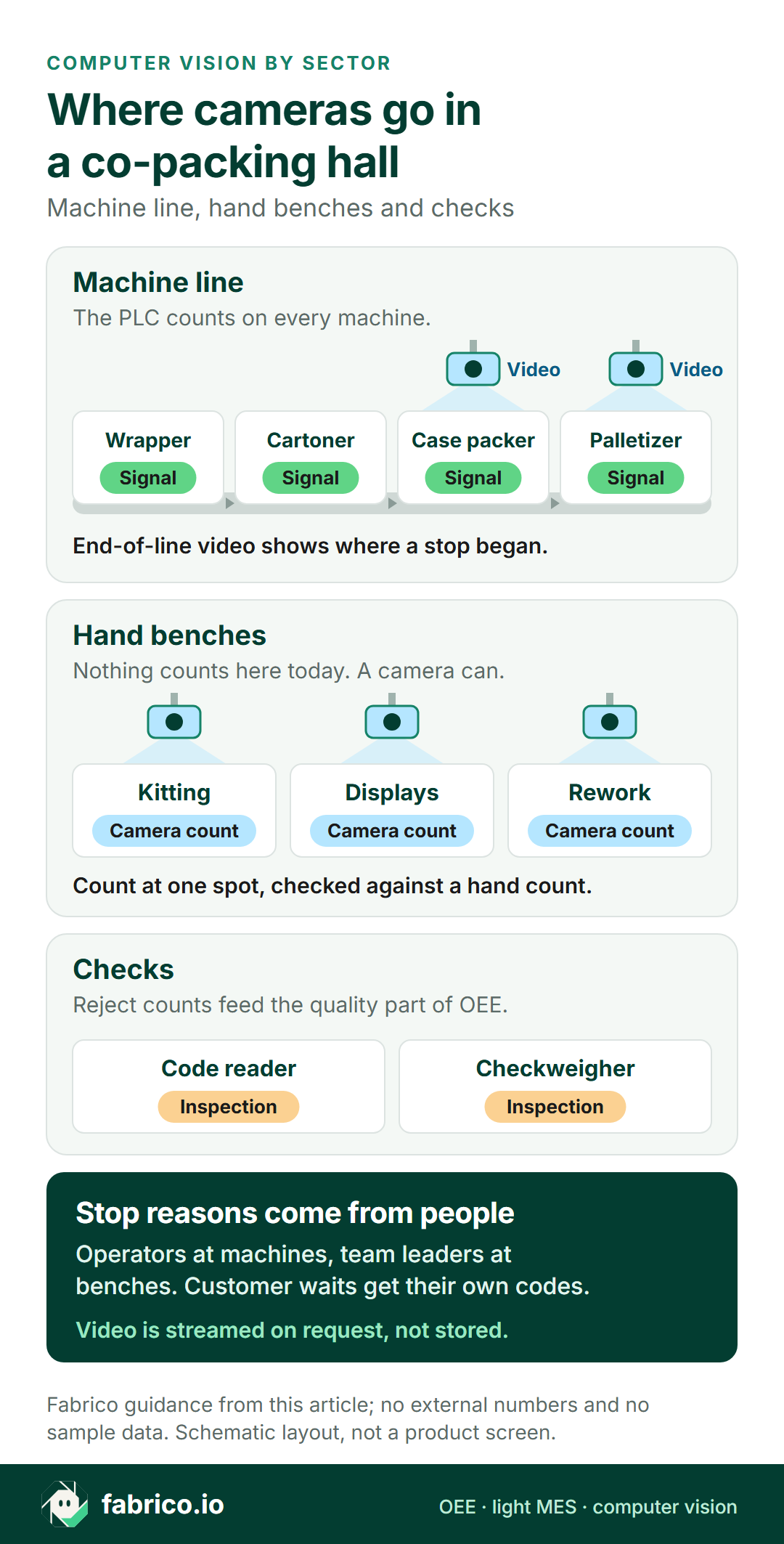
- On flow wrappers, cartoners and case packers, the machine signal counts. Video for the minute of a stop shows where it began.
- Report every job against the rate and changeover time you quoted, and keep customer-caused waits apart from your own losses.
- Code, label and seal checks stay with inspection systems. Their reject count feeds the quality part of OEE.
- Fabrico measures OEE from machine signals plus operator stop reasons, with AI cameras as an add-on that count output and show video for any minute.
A co-packer sells line time, labour and flexibility to brands that can't or won't do the work in their own plants. Demand for that is holding up. A 2024 PMMI report found that 67% of brand owners plan to maintain or increase their use of contract packaging and manufacturing.
The same report shows what brands buy it for. 48% named offering a customised product or pack, especially for short or limited runs, as a reason to hire one. That is the hardest work to measure: short jobs, packs built by hand, and a new changeover every few hours.
This page is for the operations director, plant manager or CI lead at a co-packer or co-manufacturer who is choosing camera and OEE software. It covers where a camera helps on hand work, what a job report needs, and what to ask any vendor. Why line-level OEE matters to brand owners in the first place is covered in line-level OEE for co-packers.
We sell Fabrico, so check what we say here the way you would check any other vendor.
What computer vision does in a co-packing hall, and what it doesn't
Camera systems in packing come in two kinds. Inspection vision looks at every pack and rejects the ones that fail. An OEE camera counts what was made and gives you the video for the minute a station stopped. A customer audit may ask about both, so keep them apart on the shortlist.
| Job | Inspection vision | OEE camera |
|---|---|---|
| Read the code, check the label | Yes, its main job | No |
| Check a kit holds every item | Vision or a weight check | No |
| Reject a failed pack | Yes | No |
| Count kits and displays built by hand | Not its job | Yes |
| Show why the case packer stopped | No | Video for that minute |
The handover point is the reject count. A code reader or checkweigher with a reject signal or counter can feed the quality part of OEE for the job. It tells the OEE software how many failed, not what was wrong with them.
Where the losses hide in co-packing
A co-packer loses time in places a brand's own plant rarely sees. Four stand out.
Changeovers, many times a day
PMMI found that 87% of contract packers and manufacturers plan to install new equipment in the next three years. The reasons given include more flexibility, at 78%, and faster changeover, at 53%.
One shift can bring a new customer, a new product and a new pack. Each job change means clearing the last customer's film, cartons, labels and codes, because another brand's material left on the line is a serious incident. Set a standard time for each changeover type and track the minutes over it. Our page on changeover standards and SMED in FMCG shows how to measure them.
Hand work that nobody counts
Kitting, gift sets, shipper displays, banded promo packs, sample attachment and rework are often the most labour-heavy jobs in the building. They are also the jobs most likely to be counted with a pen, which keeps them out of any OEE report.
A camera above the bench outfeed counts each finished unit at one fixed spot. Set the ideal rate for each pack format at the crew size the quote assumed. If the job runs short of people, it shows as lost speed against that rate. Our page on OEE for a manual packing station covers the setup.
Waiting on the customer
Some lost time isn't yours. Components arrive late from the brand owner, artwork is on hold, or the customer's QA release hasn't come through. On a machine line the signal times the stop. At a bench, the team leader logs it.
Give these waits their own reason codes and keep them apart from your own losses. Whether you can charge for them is a contract question, but without a timestamp and a reason it never gets asked.
Penalty clauses and the end of line
Siemens' True Cost of Downtime 2024 found that an hour of FMCG downtime still costs less than in 2019, and says this may reflect changes in the penalty clauses manufacturers face for missed production targets. In 2019, it notes, demand was flat and retailers could name their terms, penalty clauses included. A co-packer often meets such terms second-hand, through the brand owner's supply contract.
When a case packer or palletizer stops, the machines behind it fill up and stop too. If only one machine on the line is connected, its signal records the stop but not where it began. Video for that minute shows it, so the stop gets the right reason while it is fresh. That stop record is what you bring to a penalty discussion, because Fabrico's standard setup does not keep the video. See case packer downtime on camera and palletizer downtime on camera.
Camera, sensor or operator: station by station
Most co-packing halls mix machine lines and benches, and the mix changes with every contract. This tree works one station at a time. Our guide to camera or sensor by machine goes deeper on single machines.
The last branch matters more than it looks. If rework leaves a bench in three directions at once, no camera will count it well. Change the flow so finished units leave at one point, then count there.
| Station | Counts and stops from | Where a camera helps |
|---|---|---|
| Flow wrapper, cartoner | PLC signal and counter | Video when a fault code says too little |
| Shrink bundler, bander | A signal, if it has one | Counts bundles on older machines |
| Kitting or gift set bench | Nothing, or a tally | Counts finished kits |
| Display tray or shipper build | Tally sheet | Counts finished displays |
| Rework and relabel | Tally sheet | Counts units at one exit |
| Case packer, palletizer | PLC run state | Video shows where a stop began |
| Code, label, weight checks | Inspection system | No camera. Use its reject count |
Have a hall full of benches? Book a demo and bring one real job: its quote, its tally sheet and its stop notes.
Reporting each customer job: what the brand owner should see
Brand owners judge a co-packer on rate, quality and on-time delivery. A report per job answers all three, if it is built from the same numbers your own team works from.
- The quote next to the result. Planned time, the rate and crew you quoted, and the changeover standard, beside what actually happened.
- Counts that don't depend on a tally. From the machine on a line, from a camera at a bench.
- Losses split by owner. Your stops and changeovers in one group, waits caused by the customer in another, each with a reason.
- The same file every time. An export or API feed in an agreed format, so each review starts from data, not from memory.
In a customer audit, expect three questions about these numbers: how each count is made, who logs stops at the benches, and how a stop reason is chosen. Have the answer for each station written down.
PLMA, the private label manufacturers' trade body, reports that US store brand sales reached a record $282.8 billion in 2025, with unit share at a record 23.5%. If part of your work is retailer brands, that is a growing share of the jobs you will be asked to report on.
One point only co-packers face: several brands share one hall. Before a brand owner watches streamed video from their job, check what else is in the frame. A competitor's product on the next bench is a confidentiality problem, not only a privacy one.
Worked example: one customer job on a kitting bench
This is example data for one customer job. It is not a real customer's job and not a product screen.
A co-packer builds gift kits for a brand owner on a hand bench: a box, three products, a leaflet and a sleeve. The quote assumed a crew of six and an ideal rate of 4 kits a minute. The job ran over two shifts with 900 minutes of planned time.
The team leader logged 135 minutes of stops: 72 waiting for the customer's sleeves, 42 for two changeovers between kit versions, and 21 for other stops. That leaves 765 minutes of run time, so availability is 765 of 900, or 85.0%.
At 4 kits a minute, 765 minutes could make 3,060 kits. The camera counted 2,601 finished kits, so performance is 85.0%. Most of the gap came on the second shift, which ran one person short of the quoted crew. It shows in performance, not availability, because the bench kept working.
The end-of-bench check found 26 kits with an item missing, which leaves 2,575 good. Quality is 2,575 of 2,601, or 99.0%.
OEE is 85.0% x 85.0% x 99.0% = 71.5%. As a check, 2,575 good kits of the 3,600 possible in 900 minutes is also 71.5%.
Now the commercial part. The 72 minutes spent waiting for sleeves cost 8.0 OEE points, or 288 kits at the quoted rate. With a timestamp and a reason on every wait, that becomes a line in the monthly review instead of an argument.
The two changeovers ran 12 minutes over a standard of 15 each. Those 12 minutes are yours to fix, and keeping them apart from the customer's 72 is what makes the report credible.
Questions to ask any vendor of computer vision for co-packers
Put these to every vendor, us included, using one of your own jobs as the test case.
| Ask | How to test the answer |
|---|---|
| Can it report one customer job? | Ask to see a job from start to finish: planned time, quoted rate, count, stops and changeovers. |
| How fast is a new job set up? | Time it in the demo: a new SKU, its rate and its changeover standard. Co-packers add jobs every week. |
| How close is the bench count? | Film one kitting run, count it by hand, and compare the two. |
| Can losses be split by who caused them? | Ask for customer-caused reason codes and a report that keeps them apart. |
| What can the customer see? | Ask about export formats, API access, and whether a customer can see only their own jobs. |
| Who controls the video? | Ask where footage is held and who has access. With several brands in one hall, ask how other customers' products stay out of view. |
| How quickly can a camera move? | Benches change with every contract. Ask how long it takes to move a camera and get a trusted count again. |
| What does a pilot look like? | Pick one machine line and one bench, run two full jobs, and compare with your hand counts. Agree the pass mark first. |
Before the pilot, read how accurate camera OEE is, so you know what a fair test looks like. For the five kinds of OEE software and how to choose, see our OEE software overview.
Privacy, agency staff and the works council
A camera above a bench sees the people working at it. Where you have a works council or employee representatives, agree the purpose and the camera positions with them before anything goes up.
Co-packers add a twist: peak work often runs on agency staff. Tell temporary workers what the camera does, in their own language, on their first day. A sign at the bench helps.
- Point it at the work surface. The outfeed or the finished kit, not faces.
- Limit who opens video. Team leaders and CI for stop checks, agreed in writing.
- Know the default. In Fabrico's standard setup, video is streamed on request and is not stored in Fabrico.
Roadmap: masking people in the frame beyond what exists today, so ask us for the current state. Our guide to GDPR and production line cameras covers the legal side.
How Fabrico does it
Fabrico is a cloud platform for OEE and light MES. This is what it does in a co-packing hall today, what is still roadmap, and what stays with other systems.
- Machine lines: stops and counts come from the machine signal, whether a PLC, a sensor or a counter. Operators pick the stop reason at the line, on a tablet or phone.
- Benches: the AI camera add-on counts finished units where no machine signal exists. Team leaders can open the video for any moment on the shift timeline. The standard setup streams it on request and does not store it in Fabrico.
- Reports: OEE, downtime and losses by line and shift, with losses in money, on the web, iOS and Android. Ask us in the demo to show how runs for each customer are reported.
- Data out: REST API, webhooks, and Excel or CSV export, so you can build the customer report in the format the brand owner asks for.
- Roadmap: cameras that spot pauses at a bench on their own, mark jam zones and suggest a likely reason for the team leader to confirm. Not live today.
- Not Fabrico: code, label, seal and kit content inspection. Those systems stay, and their reject counts can feed OEE. For planning and scheduling jobs, ask us in the demo.
If you are still comparing OEE platforms in general, our OEE software guide is the place to start. For the wider consumer goods picture, see our FMCG industry page. Then test us on the eight questions above with one of your own jobs.
Book a demo with one of your jobs, or contact us.
What co-packers ask next
Can a camera count kits and displays built by hand?
Yes, if each finished unit passes one fixed spot, such as the bench outfeed or a pallet station. Check the camera count against a hand count over a few full jobs before you report it to a customer.
Can we show a brand owner the video from their job?
You can open it with them, but check the frame first. In a shared hall, another customer's product may be in view. In Fabrico's standard setup video is streamed on request and not stored in Fabrico, so ask how far back it can be opened before you promise it. Agree in the contract who can see video, and ask your works council where you have one.
Does the camera check that each kit is complete?
No. Checking contents is inspection, done by a vision system or a checkweigher. Its reject signal or counter can feed the quality part of OEE for the job.
Can the camera tell us why a bench stopped?
Not today. The team leader logs the stop and its reason, and can open the video for that minute to check. Roadmap: a camera that spots the pause on its own and suggests a likely reason to confirm.
Where should a co-packer put its first camera?
On the hand-built job with the most labour and the least trusted count, often a kitting or display bench. Run it for two or three jobs before you decide on the next camera.
What drives the cost of computer vision for a co-packer?
Mainly how many lines and benches you want covered, the cameras that takes, mounting, network access and training. Benches that move between jobs may need movable mounts, so list them apart from fixed lines when you ask for quotes.
Want to see how one of your jobs would look? Book a demo.
Related articles




Real Fabrico tiles, sample data.