Login
 Blog

Production Line Efficiency Software: 5 Tools Compared (2026)
TL;DR
Production efficiency software measures how much of the planned time a line turns into good output, and shows where the rest goes: breakdowns, changeovers, short stops, slow cycles and rejects. The five tools below all capture stops automatically. They differ in how they collect the data, what they show the line and how far they reach beyond the score.
- On fast lines the biggest losses are often short stops and slow cycles that never reach a paper log. Ask every vendor how it detects them.
- A score alone does not raise efficiency. What raises it is a cause on every stop and someone acting on the top loss during the shift.
- Fabrico is a light MES: machine data, downtime by cause and OEE, on PLC, older and manual machines alike.
- Each vendor description comes from the vendor's own website, checked on 21 October 2026. Fabrico is our product.
- Start on one pilot line, price its losses, fix the biggest one, then scale.
What production efficiency software measures
Line efficiency is usually measured as OEE: availability, how much of the planned time the line ran; performance, how fast it ran against its ideal cycle; and quality, how much of the output was good. Multiplied together, they show how much of the planned time became good units. Our guide to OEE calculation walks through the formula.
The number matters less than the split behind it. A line at 65% OEE with an availability problem needs maintenance and changeover work. The same 65% with a performance problem needs someone to look at short stops and cycle speed.
Where a production line loses efficiency
| Loss | What it looks like on the line | What the software needs to catch it |
|---|---|---|
| Breakdowns | The line stops until a repair is done | Automatic stop detection and a cause on each stop |
| Changeovers | Time between the last good unit of one product and the first good unit of the next | Changeovers recorded apart from other stops, against a standard |
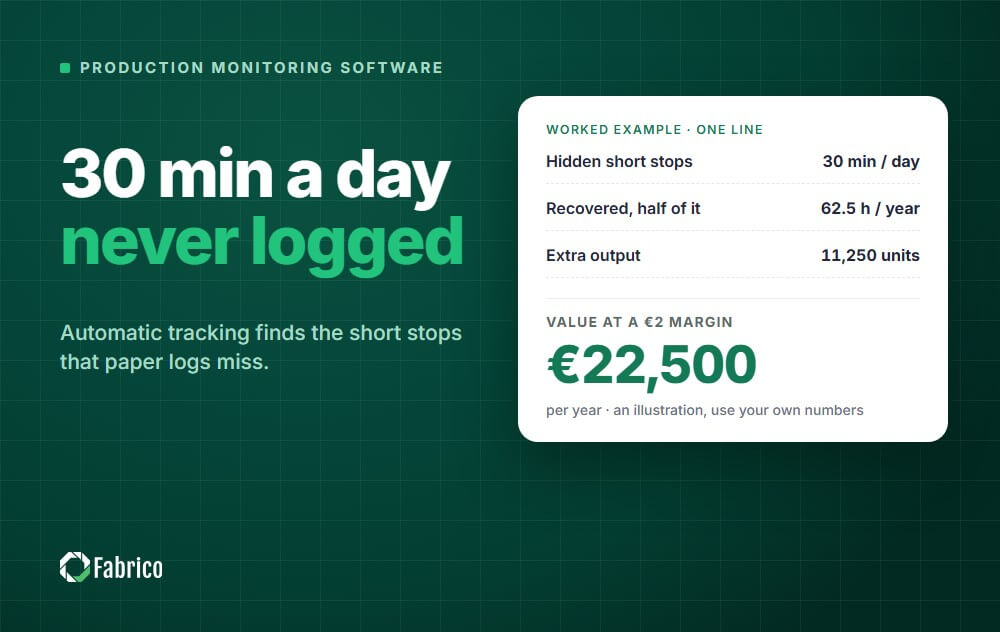
| Short stops | Jams and blockages of seconds to a few minutes, cleared at the machine | Detection from the machine signal, since nobody writes them down |
| Slow cycles | The line runs, but below its ideal speed | Actual cycles compared with the ideal cycle time |
| Rejects | Units made but not good, at startup or during the run | Good and reject counts, from a sensor or entered on a tablet |
Our guide to micro-stops explains why the short ones add up to more than most plants expect.
5 production efficiency tools at a glance
Fabrico is listed first because it is our product. The other four are in alphabetical order, not ranked.
| Tool | What the vendor calls it | How it collects line data, per the vendor | Built for, per the vendor |
|---|---|---|---|
| Fabrico | Light MES, MES and OEE software | PLC, a Fabrico IoT device with external sensors, AI cameras | FMCG, food and industrial manufacturing groups |
| Evocon | OEE software | Its IIoT device with sensors or PLC outputs, or HTTPS requests | Manufacturers across 15+ industries, such as food and beverage, packaging and pharmaceuticals |
| LineView | Navigator, "Not an MES" | Reads directly from PLC code at sub-second frequency | High-speed beverage and packaging lines |
| MachineMetrics | Manufacturing operations system for discrete manufacturing | Machine controls over OPC UA, FOCAS, MTConnect and more, with I/O for older machines | Discrete manufacturing |
| Vorne XL | Standalone device with I/O, scoreboard and reporting | One or two sensor inputs, or a PLC data link | Any discrete manufacturing process |
1. Fabrico
Disclosure: Fabrico is our product.
What it is: a light MES, the monitoring and OEE layer of an MES. It measures each line's efficiency from machine data, records stops on connected machines, lets operators tag the cause and shows OEE by machine, line and shift while the shift is still running.
How it finds lost efficiency
- Stops recorded with their start and duration on connected machines, and the cause tagged by the operator on a tablet or phone.
- Micro-stops detected from the machine signal, including stops too short for anyone to write down, and slow cycles counted as performance loss.
- OEE split into availability, performance and quality, so the shift lead checks cycle speed before calling maintenance when performance drops.
- Downtime by cause, machine and shift, for this week or a past period, with live line status and output so far in the shift.
- Any machine: the PLC on automated lines, an IoT device with external sensors on older machines, AI cameras at manual steps.
- When a stop needs a repair, a technician opens a work order from it on the same machine record (built-in CMMS).
Results customers report
On the Fabrico product page, ABB reduced downtime by 20%, Ficosota raised factory-wide OEE from 53.1% to 59.6%, and a European defence manufacturer raised OEE from 20% to 62% in three months after connecting 80 FANUC CNC machines in 6 weeks, with no PLC changes.
Things to consider
- Production planning and scheduling are on the Fabrico roadmap, not in the product today.
- Machines without a usable signal need an IoT device or a camera first. Plan that into the pilot.
2. Evocon
What it is: Evocon describes itself as "a visual and user-friendly OEE software that helps manufacturing companies improve productivity and remove waste as they become better."
What Evocon highlights
- Data from its IIoT device, using a new industrial sensor, an existing sensor on the line or a PLC output through a relay, or HTTPS requests where machines already log data.
- Downtime captured automatically in real time, with operators logging the reason from clear categories.
- Speed loss shown separately, with slow speed and micro stops as its two categories.
- Shift View and Factory Overview for live performance across shifts, stations and sites, plus digital checklists.
- ERP integration, which Evocon calls its most common integration, with SAP and CMMS integrations listed.
- Cloud-based; Evocon says it does not offer an on-premise option.
Best suited to
Evocon names food and beverage, building materials, pharmaceuticals, packaging and paper products among its most common industries, and says it counts units automatically for discrete production. It describes itself as a standalone product that mainly specializes in monitoring OEE.
Things to consider
- Evocon says it is not ideal for custom, one-off work. Check the fit if you run a job shop.
3. LineView
What it is: LineView says it "helps the world's leading manufacturers drive manufacturing efficiency improvements with smart factory solutions and operational guidance." Its main product is Navigator.
What LineView highlights
- Data read directly from PLC code at sub-second frequency, not from a historian or an OPC aggregator.
- Micro-stoppages under 30 seconds captured from PLC signals and ranked by their cumulative impact.
- Live OEE, throughput, line speed and operational mode, with every stop scored by its impact on output.
- Shift reports generated automatically from the same PLC data, breaking down lost time by category.
- SmartWorker guided workflows for shift handover, root cause analysis, centrelining audits and CIL checks.
- Connections to existing PLCs, historians, MES and ERP, with data flowing to BI tools.
Best suited to
LineView says Navigator is "purpose-built for high-speed beverage and packaging lines," and lists soft drinks and water, beer, wine and spirits, dairy and food manufacturing. It also offers Vorne XL hardware under the name LineView XL.
Things to consider
- LineView says Navigator is "Not an MES" and is built to fit your existing stack. Plan which system keeps orders and scheduling.
4. MachineMetrics
What it is: MachineMetrics describes its platform, MaximaOS, as "one platform, running on real-time machine data, purpose-built for discrete manufacturing."
What MachineMetrics highlights
- Connections to machine controls over OPC UA, FOCAS, MTConnect, EtherNet/IP, Modbus TCP and MQTT, with sensors and I/O adapters for older equipment.
- Downtime detected from machine data with no operator input and no minimum duration, so short stops are recorded too.
- Performance against the ERP standard cycle time for each part, matched automatically.
- Utilization, OEE, downtime and setup reports out of the box.
- Scheduling and ERP connectors for Epicor Kinetic, Infor and JobBOSS², which MachineMetrics positions as part of a next-gen MES.
Best suited to
Discrete manufacturers, including aerospace and defense, automotive, contract manufacturing, job shops, medical devices and industrial equipment.
Things to consider
- The platform reaches into scheduling and work orders. Decide whether you need that now or only the efficiency layer.
5. Vorne XL
What it is: Vorne says "XL is a standalone device that includes I/O to communicate with your process, a scoreboard for your operators, and built-in reporting for your managers."
What Vorne highlights
- One or two sensor inputs from an existing photo-eye, relay, proximity switch or encoder, or a PLC data link.
- Automatic run detection and downtime reasons captured at the line, including with a barcode scanner.
- A Top Losses report that ranks every loss in time: down reasons, slow cycles, small stops, rejects and changeovers.
- Built-in reports such as OEE, Downtime, TEEP and Changeover, a line-side scoreboard and emailed shift reports.
- An embedded webserver with no software to install, and an optional cloud part, XL Enterprise.
Best suited to
Vorne says XL works on any discrete manufacturing process and scales from one machine to an entire enterprise.
Things to consider
- XL is a hardware appliance per line or machine. Plan the number of devices and the sensor for each line before the pilot.
Who should pick what
- Pick Fabrico if you want efficiency losses by cause on a mix of PLC, older and manual machines, inside a light MES that grows with you, proven on one pilot line first.
- Look at Evocon if you want a standalone, cloud-based OEE tool focused on monitoring OEE, and you do not need an on-premise option.
- Look at LineView if you run high-speed beverage or packaging lines and want PLC-level loss analysis next to your existing systems.
- Look at MachineMetrics if your floor is CNC and discrete work and you also want scheduling tied to machine data.
- Look at Vorne XL if a line-side scoreboard on a self-contained device matters most to you.
How to raise line efficiency: pilot line first
- Connect one representative line, ideally the bottleneck, and capture run, stop and count automatically.
- Agree a short list of stop reasons and the ideal cycle time for each product.
- Measure the losses in money for a few weeks, so the top loss is clear.
- Act on the top loss with a named owner, then measure again. Our guide on how to reduce machine downtime has 15 practical ways.
- Prove the recovered output, then extend to the next line with the same rules.
If you are weighing a full MES against a lighter start, our guide to light MES explains what each covers.
Frequently asked questions
What is production efficiency software?
Software that measures how much of the planned time a line turns into good output, and shows where the rest is lost. Most tools measure it as OEE and break the losses into stops, slow running and rejects.
Is production efficiency the same as OEE?
In practice, OEE is the standard way to measure line efficiency. Some plants also track output per hour or per person, but OEE is the measure that splits the loss into availability, performance and quality, which tells you where to look.
How do you capture micro-stops?
From the machine signal. Stops of a few seconds are too short and too frequent for operators to log, so the software has to detect them from run and cycle signals and count them as performance loss.
Do I need a PLC on every machine?
No. Machines with a usable PLC can be read directly, older machines can get add-on sensors, and manual stations can use cameras or operator input.
How fast can I see results?
The first losses show up as soon as a line is connected and stops carry causes. With Fabrico, installing and connecting the devices on your machines takes about one month, and the full rollout is complete in 3 to 4 months.
See where your lines lose efficiency, by cause and shift: book a demo.
Related articles