


 Login
 Blog
Scaling Computer Vision From One Line to the Whole Plant

In short: Scaling computer vision from pilot to full plant works when you copy what the pilot proved, not just the cameras: the same station templates, names and definitions on every line, rolled out in waves with a gate between them.
- Pick the next line by the unexplained loss you can value, and by how many blind stations it has, not by who asks first.
- Turn each pilot station into a template: mount, view, counting zone, light and a hand-tally test.
- Name a day-to-day owner for every camera, and agree what happens when a new pack format arrives.
- Plan network capacity per wave, from bandwidth measured on the pilot line.
- Run a short readiness check before each wave, and the same one for each new site.
The pilot worked. The counts matched a hand tally, the team used the data, and the decision meeting said scale. Now comes the hard part: going from one line to twelve without losing what made the pilot work.
This guide starts where our computer vision OEE pilot guide ends. For the loss model and reason codes, see scaling MES from pilot line to plant. This page covers what is specific to cameras.
We sell Fabrico, OEE and light MES software with a camera add-on. Test what we say here like any vendor's claims.
Scaling computer vision from pilot to plant: what changes
A pilot is one line and a lot of attention. A plant is many lines, three shifts, and cameras nobody looks at until a count goes wrong. The World Economic Forum's 2023 Global Lighthouse Network report describes its newest Lighthouse factories as having "progressed beyond pilot purgatory" and starting "the steep journey of scaling". The wording is telling: even the leaders call scaling steep.
| Topic | On the pilot line | Across the plant |
|---|---|---|
| Cameras | A few, set up by hand | Many, from written templates |
| Definitions | Agreed in one room | Frozen, versioned, same on all lines |
| Care | The project team | Named owners on each shift |
| Network | One switch, one VLAN | Capacity planned per wave |
| Product changes | Rare in the pilot window | Routine: new formats, new SKUs |
| Decisions | One sponsor | A small group with change control |
Every row on the right is work the pilot did not need. Plan it before the first wave.
Which line goes next, and why
Pick the line where a camera earns the most and the pilot's templates fit, not the loudest request. Three filters:
- Value: how much lost time the current data cannot explain, valued at the constraint.
- Fit: blind stations of types the pilot proved. See how many cameras a line needs.
- People: a line owner who wants the data and will use it daily.
Line wave or station-type wave?
Pick a line wave if line owners need full line OEE, a station-type wave if one proven station repeats across lines, and both if the next line has one new station type among proven ones.
| Approach | Pick it if | Watch out for |
|---|---|---|
| Line wave | Line owners need full line OEE | A new station type slipping in untested |
| Station-type wave | One station repeats across lines | Lines that only have part of their data |
| Both | Mostly proven stations, one new | Keep the new one's test separate |
| Stop and fix | Pilot counts still disagree with a tally | Copying a fault to every line |
Want a second view on the wave plan? Book a demo and bring your station list.
Worked example: ranking three candidate lines
Illustrative, sample data, not a customer. OEE is good units at the ideal rate divided by planned time. The lost time that the current stop log and speed data cannot explain is the gap a camera can close, valued at a sample contribution per constraint minute.
- Line B: 6,000 planned minutes a week, ideal rate 120 a minute, 504,000 good units. 504,000 / 120 = 4,200 minutes, so OEE = 4,200 / 6,000 = 70%. Of 1,800 lost minutes, 1,200 are explained; 600 sit around two hand-pack stations. At a sample EUR 30 a minute: EUR 18,000 a week.
- Line C: 6,000 minutes, 80 a minute, 312,000 good units: 3,900 minutes, OEE 65%. Of 2,100 lost minutes, 300 are unexplained, at one manual case packer. At a sample EUR 40: EUR 12,000.
- Line D: 4,800 minutes, 60 a minute, 216,000 good units: 3,600 minutes, OEE 75%. Of 1,200 lost minutes, 800 are unexplained, across four stations. Demand limits this line, so a minute is worth a sample EUR 10: EUR 8,000.
Per blind station, that is EUR 9,000 for B, EUR 12,000 for C and EUR 2,000 for D. Lines B and C go in wave 1; C is the quickest win. Each lost minute is counted once and valued at the constraint; B and C carry different sample values per minute because their products earn different margins there. Unexplained minutes are what a camera can reveal, not a saving. Only the share you then remove pays back. Our OEE calculation guide has the formula.
Standard station templates
The pilot set up each camera by hand. Write a one-page template for each blind station type instead, and use it on every line.
- Mount: height, angle and a photo of the correct view.
- Counting zone: where a unit counts, drawn on the photo.
- Light: what the station needs and what breaks it. See camera placement and lighting.
- Count point: pack, case or tray, matching the ideal rate.
- Acceptance test: camera count against a hand tally at full speed, recorded.
The WEF report shows why packaging matters: one WEF Lighthouse plant turned its computer vision work into a toolkit, and the report says that toolkit enabled five distinct computer vision use cases in four months. That example comes from quality work, not OEE counting, but the lesson carries over. For how accurate counts should be, see how accurate camera OEE is.
One set of names and definitions across lines
Two lines that define a minor stop differently cannot be compared. Freeze the pilot's definitions and give them a version number.
- Names: one pattern for every camera (site, line, station, number), used on the register, the switch port and the OEE screen.
- Definitions: count point, ideal rate per product, minor stop threshold, reason list. Lines may add local detail, not change shared ones.
- Change control: a change is approved once and applied to every line that uses it.
The loss tree follows the same discipline as any MES rollout; the MES scaling guide covers it.
Network capacity grows with each wave
One pilot line rarely strains a network; twelve can. The rule from the line camera network guide holds: video is heavy, counts are light. At scale, the sum changes.
- Measure first: use bandwidth per camera measured on the pilot line, not a data sheet.
- Know where frames are processed: near the line, the uplink mostly carries counts plus the video people open, so plan for peak viewing, such as shift handover. Illustrative, sample data: 12 cameras measured at 4 Mbit/s each while viewed, 5 opened at handover, gives 5 x 4 = 20 Mbit/s peak on the uplink. If every camera streams to a remote server, load grows with each wave. See edge vs cloud for line video.
- Keep cameras in their own zone: NIST's OT security guide, SP 800-82 Rev. 3 notes that segmentation is typically done with separate switches or VLAN configurations. Extend the pilot's camera zone line by line.
- Prefer cable: Power over Ethernet carries power and data, and avoids Wi-Fi gaps near metal.
Who owns the cameras day to day
If nobody owns a camera, a dirty lens or a knocked bracket shows up later as an odd OEE trend. Agree owners before the wave starts.
| Task | Who, day to day | Escalate to |
|---|---|---|
| Lens clean, view check | Line operator, start of shift | Team leader |
| Knocked or moved camera | Maintenance, re-aim to template photo | Central CV owner |
| New pack format | Line or CI engineer, hand-tally test | Vendor, for retraining |
| Camera register, firmware, accounts | IT or OT | OT security lead |
| Requests to see video | Data protection lead | Works council, where one exists |
| Template changes | Central CV owner | Steering group |
Keep a camera register: name, location, firmware, who to call. NIST SP 800-82 asks organizations to consider how critical "a complete and accurate asset inventory" is for managing OT risk. Cameras belong on it.
New formats and products: when the count needs retraining
A pilot rarely sees a new pack design; a plant sees them often. A new shrink film, a taller bottle or a tray in a new color changes what the camera sees. NIST's AI Risk Management Framework warns that AI systems "may require more frequent maintenance" because of data, model or concept drift, and that training data can become "stale or outdated relative to deployment context". That is exactly what a new pack format does.
- Flag it. Put camera stations on the new-product checklist, next to labels and pallet patterns.
- Test it. On the first run, count a sample by hand against the camera at full speed.
- Fix it. If the counts drift apart, the vendor adjusts or retrains the count model.
- Sign it. Record the test and the template version before the line relies on the count.
Ask each vendor who does step 3, what they need (sample units, clips), and whether it costs extra. A downstream case counter is a cheap cross-check that flags a drifting count early.
Roll-out waves and governance
Scale in waves, each passing the same gate: counts match a hand tally, owners are named, network capacity is measured, and the privacy sign-off covers the new area.
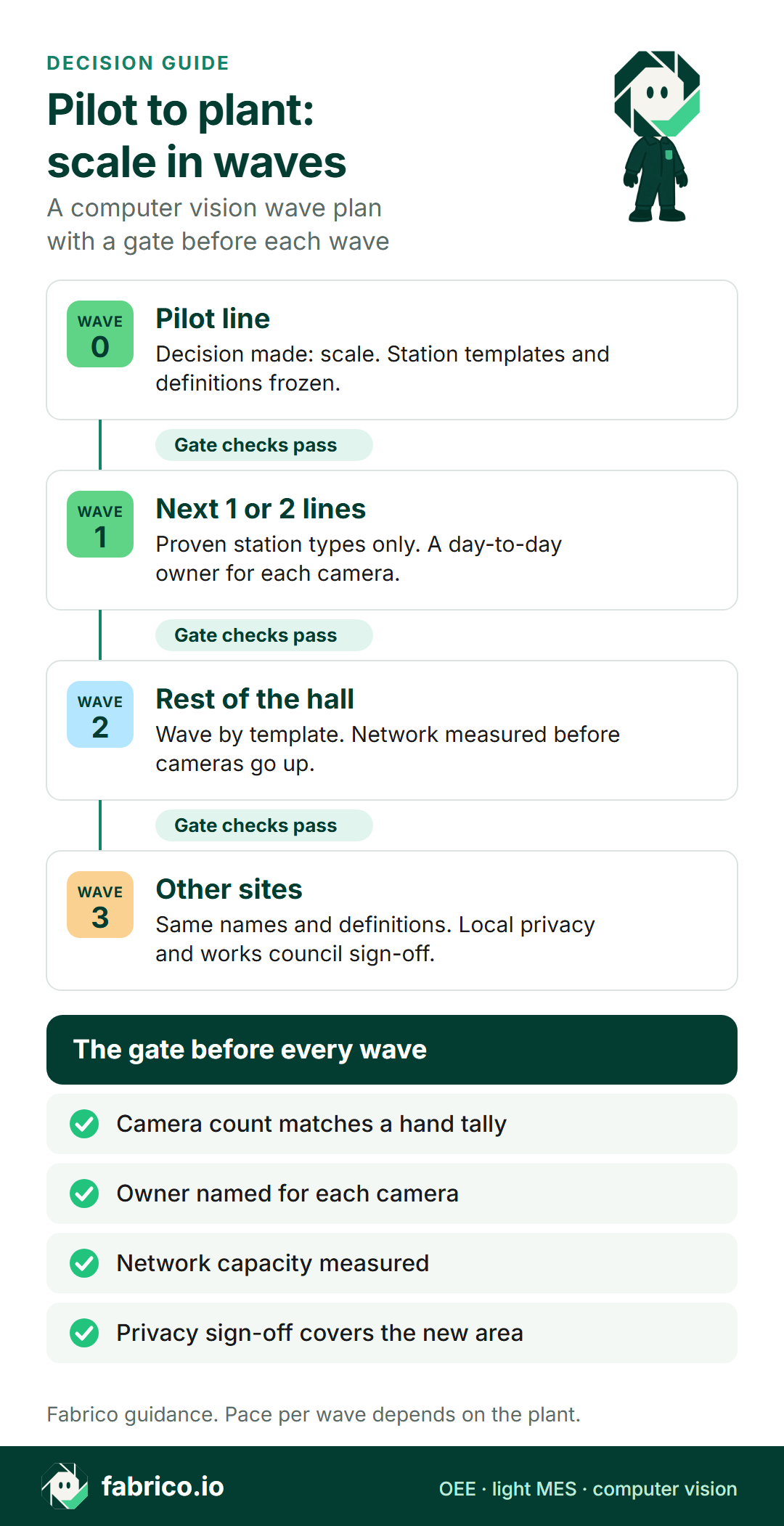
Keep governance light. A small steering group (sponsor, central CV owner, IT/OT, data protection lead) meets monthly, approves template changes and decides when a wave passes its gate. Keep the cameras' purpose as in the pilot: product flow, not people. See production line cameras without surveillance and GDPR and production line cameras.
Multi-site
A second plant is a wave with extra steps. Names, definitions and templates travel; the network check, works council and data protection review do not. Start from a lead site and let its team write the playbook. With shared definitions, a multi-plant view compares like with like. For sector detail, see computer vision for food manufacturing, beverage lines or co-packers.
Readiness checklist before each wave
Put these to your own team and to any vendor, including us.
| Check | How to test it |
|---|---|
| 1. Decision recorded | The pilot said scale, with numbers. |
| 2. Templates written | One page and photo per blind station type. |
| 3. Definitions frozen | Count point, ideal rate, minor stop threshold, reasons, versioned. |
| 4. Counts proven | Camera vs hand tally at full speed, for each template. |
| 5. Network measured | Bandwidth per camera from the pilot, and a plan for the peak. |
| 6. Owners named | A day-to-day owner and an escalation path for each camera. |
| 7. Retraining path | Who adjusts the count for a new format, what they need, what it costs. |
| 8. Privacy covered | Works council and data protection sign-off reach the new lines or site. |
| 9. Register up to date | Every camera listed with its name, location and firmware. |
If you are still choosing a platform, our reviews of computer vision software for manufacturing OEE and of OEE software list what to compare.
Where Fabrico fits
Fabrico is a cloud OEE and light MES platform. Stops and counts come from the machine signal through the PLC or a sensor; the operator adds the stop reason on a tablet or phone. Losses show by line and shift, in money, on the web, iOS and Android. Data leaves through a REST API, webhooks and Excel or CSV export.
- Camera add-on, on request: the AI camera add-on counts output at stations with no usable signal, such as hand-pack tables.
- Video: with the camera add-on you can open the video for any moment on the shift timeline. In the standard setup, video is streamed on request, not stored in Fabrico.
- Sizing: the camera add-on is quoted per plant once the line review shows how many stations need one.
- Several plants: ask to see the multi-plant view, where plants sit side by side on the same numbers.
- Timing: Devices connected in about a month; full rollout in 3 to 4 months.
Roadmap, not live today: stops detected by the camera, and a camera suggesting a likely stop reason for the operator to confirm.
Not included: Fabrico does not sell quality inspection; inspection cameras are a different job from the camera add-on. They check packs for defects, and their reject counts can feed the quality part of OEE.
Ask in the demo: how a camera add-on count is adjusted for a new pack format, who does it and what they need.
See Fabrico computer vision for OEE, light MES and OEE in Fabrico and computer vision for FMCG manufacturing. The nine checks above apply to us too.
What people ask next
When is a computer vision pilot ready to scale?
When the decision meeting has said scale, the camera counts match a hand tally at full speed, the station templates and definitions are written down, and someone has agreed to own the cameras day to day. If any of those is missing, fix it on the pilot line first.
Which line should come after the pilot line?
Rank candidate lines by the unexplained loss you can value at the constraint, then by how many blind stations need a camera. A line with proven station types and a willing line owner usually goes first.
Does every line need cameras?
No. Cameras go only where a station has no usable machine signal, such as a hand-pack table or an old machine. Other stations connect through the PLC or a sensor.
How much network capacity does a plant-wide camera rollout need?
Measure bandwidth per camera on the pilot line first. If frames are processed near the line, plan for the video people open at the same time. If every camera streams to a remote server, the total grows with each wave.
What happens when we launch a new pack format?
Treat it as a change. Count the new format by hand against the camera at full speed. If the numbers drift apart, the vendor adjusts or retrains the count, and someone signs it off before the line relies on it.
Who should own the cameras day to day?
The line team keeps lenses clean and checks the view, maintenance re-aims a camera that was knocked, IT or OT keeps the camera register, and one central owner controls the station templates.
Can we scale to other sites with the same setup?
Yes, if the names, definitions and templates are the same, so that sites compare like with like. Each site still needs its own network check and its own privacy and works council sign-off.
Want to see the camera add-on and the multi-plant view on a line like yours? Book a demo and bring your pilot results.
Related articles



Latest from our blog



Real Fabrico tiles, sample data.