


 Login
 Blog

Production Monitoring Systems for Manufacturing: How They Work, 7 Compared (2026)

Key takeaways
- A manufacturing production monitoring system records machine status, output, cycle times and downtime automatically, so the shift is measured instead of estimated.
- Systems differ most in how they get the data: from the PLC, from sensors, from cameras, or from operator input.
- Monitoring shows the loss. What matters next is who acts on it, and whether that happens in the same system.
- Each vendor description is based on the vendor's own website, checked in September 2026. The "Things to consider" notes are our own suggestions, and Fabrico is our product.
- Test any system on your bottleneck machine and compare its numbers with what you already know.
What is a production monitoring system?
A production monitoring system, also called a manufacturing monitoring system, is hardware and software that tracks what manufacturing equipment is doing, in real time. Fabrico's machine monitoring software is one example: it logs stops automatically from the PLC, an IoT sensor or a camera.
It replaces paper logs and end-of-shift estimates with a live timeline of every machine: running, stopped, in changeover, and how much it produced.
A production monitoring system is also the core of a light MES: machine data, live status, stops with the cause operators tag and OEE, with orders left in the ERP. If that is all you are missing, you do not need a plant-wide MES project to get it.
What a production monitoring system measures
| Data | Why it matters |
|---|---|
| Machine state | Shows when the machine runs, idles or stops |
| Part counts | Shows output against target, good and rejected |
| Cycle time | Shows whether the machine runs at its ideal speed |
| Downtime and reasons | Shows where time is lost, and why |
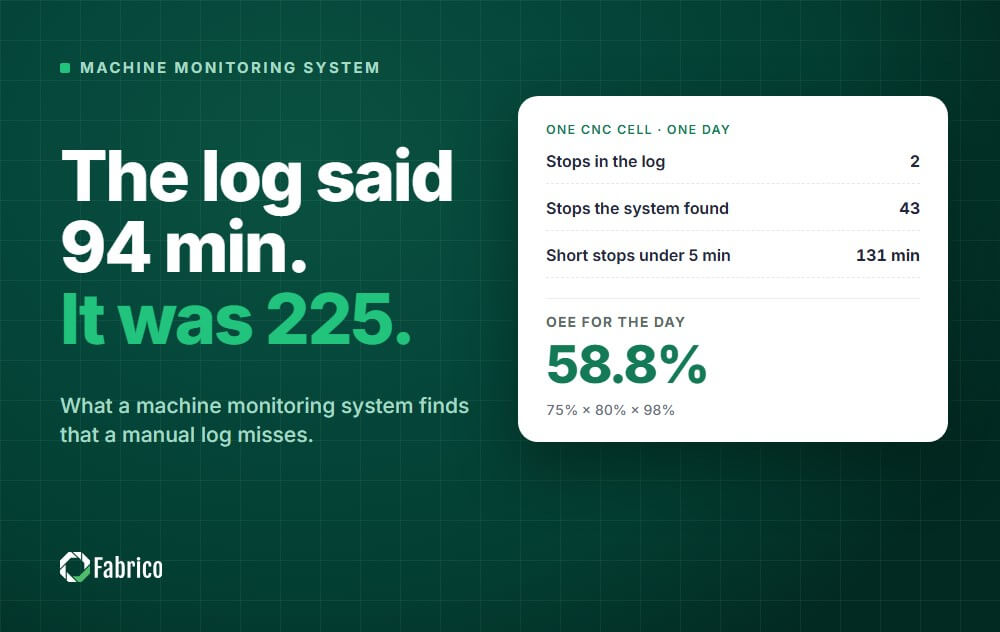
| Short stops | Reveals losses that manual logs usually miss |
| OEE | Combines availability, performance and quality into one score |
The difference between production monitoring and OEE is explained in production monitoring vs OEE.
Four ways manufacturing monitoring systems get production data
| Data source | Strengths | Things to plan for |
|---|---|---|
| PLC or machine controller | Detailed and accurate, including alarms | Access to the controls and coordination with automation engineers |
| Retrofit sensors | Works on older machines, quick to install | Stop reasons often need operator input |
| Cameras | Covers steps with no electrical signal | Clear rules on what is filmed and who sees it |
| Operator input | Adds context, such as the reason for a stop | Depends on discipline, and often misses short stops |
Most plants end up combining sources. See PLC connectivity, monitoring without a PLC and cameras without surveillance.
7 production monitoring systems at a glance
We picked systems that monitor machines automatically and publish their capabilities on their own websites, checked on 16 September 2026. Our guide to production tracking software lists what to record and how to choose a system.
Fabrico is listed first because it is our product. The other six are listed in alphabetical order, not ranked. For six more real-time tools, see our production monitoring software comparison.
| System | Machine data and fit, per the vendor |
|---|---|
| Fabrico | Data: PLCs, IoT devices with external sensors and AI cameras, feeding one OEE calculation Best suited to: Plants that want a light MES: live monitoring, downtime by cause and OEE, with orders kept in the ERP |
| Epicor Advanced MES | Data: Machines and sensors, including Epicor's own data collection unit Best suited to: Manufacturers in the industries Epicor lists, such as fabricated metals, industrial machinery and plastics |
| MachineMetrics | Data: CNC and PLC controls, Kepware and OPC UA, plus IO and sensor paths Best suited to: Discrete manufacturers, including job shops and contract manufacturers |
| Plex Production Monitoring | Data: Machine connectivity through Plex MES A&O Best suited to: Discrete, hybrid and regulated manufacturers |
| Redzone | Data: Automatic collection, with integrations to SCADA, PLCs and edge devices Best suited to: Enterprise manufacturers that want production, quality and maintenance teams on one platform |
| Tulip | Data: Edge devices with OPC UA and Node-RED, feeding no-code apps Best suited to: Manufacturers that want composable, configurable operator apps |
| Vorne XL | Data: A hardware appliance wired to line sensors, with a PLC data link Best suited to: Discrete manufacturing processes |
1. Fabrico
Disclosure: Fabrico is our product.
What it is: a light MES, the monitoring and OEE layer of an MES. It shows what each connected line is doing right now, records stops, lets operators tag the cause and turns the same machine data into OEE by line and shift.
How it monitors production
- Automated lines: cycles, stops and output read from the line's PLC.
- Older or semi-automated machines: a Fabrico IoT device with external sensors collects the production signal.
- Manual or hybrid steps: AI cameras count output and detect cycles where there is no machine signal.
- Line status and live output: running or stopped, how long the current stop has lasted, and units produced so far in the shift.
- Downtime by cause: operators tag the cause of each stop on a tablet or phone, and micro-stops and slow cycles are detected from the signal.
- Real-time OEE by machine, line and shift, with a multi-plant view and push, in-app and email notifications.
- ERP integration: two-way sync with SAP PM, a connection to SAP S/4HANA, and custom integrations, a REST API, webhooks and Zapier for other systems.
When a stop needs a repair
A technician opens a work order straight from the stop, on the same machine record, so MTTR and MTBF build up from the same data. The built-in CMMS is there for that hand-over; the core of Fabrico is the monitoring and OEE.
Things to consider
- Production planning and scheduling are on the Fabrico roadmap, not in the product today. Plan scheduling in your ERP or a dedicated tool.
- Job dispatching, BOMs, routings and genealogy are not part of Fabrico. Plants that need them keep them in the ERP or another system.
- Machines without a usable signal need an IoT device or a camera first. Include that in your rollout plan.
2. Epicor Advanced MES
What it is: Epicor says Advanced MES "collects data directly from equipment and operators on the shop floor in real-time, maximizing data accuracy and process automation."
How it monitors production
- Automatic capture of data from machines and sensors, including Epicor's own Connected Factory Machine Interface Unit.
- Real-time visibility when a machine is not running efficiently.
- Automatic messaging and escalation to supervisors, maintenance crews and engineers.
- OEE improvement from automated production monitoring, with deeper OEE analytics in Epicor Data Analytics for Advanced MES.
Maintenance and other modules
- Epicor lists modules for SPC and SQC, scheduling and preventive maintenance.
Things to consider
- Epicor says Advanced MES connects with your existing ERP system. Confirm the connector for the ERP you run.
3. MachineMetrics
What it is: MachineMetrics calls its platform, MaximaOS, "the AI-powered operating system for discrete manufacturing."
How it monitors production
- Native connections to CNC and PLC controls, connections through Kepware and OPC UA, and IO and sensor paths for machines with no modern control.
- MachineMetrics says downtime events "are detected the moment they happen, straight from machine data, with no operator input and no minimum duration."
- Utilization, OEE, downtime and setup reports come out of the box.
- An AI interface lets users ask about production, downtime, OEE or cost in plain language.
Maintenance
- MachineMetrics says condition-based alerts trigger work orders in your CMMS. Confirm the connection to the CMMS your maintenance team uses.
Things to consider
- MachineMetrics says it runs cloud-delivered, with edge devices managed centrally across sites. Share its IT and security details with your IT team early.
4. Plex Production Monitoring (Rockwell Automation)
What it is: Plex says its Production Monitoring Software, "powered by Plex MES A&O, provides seamless connectivity to and from machines on the plant floor."
How it monitors production
- Machine status, output and downtime as it happens, according to Plex.
- Measurement of quality, OEE performance and availability.
- Part of the wider Plex Smart Manufacturing Platform, which also covers MES, quality and scheduling.
- Rockwell describes FactoryTalk ResilientEdge as an MES edge solution that extends cloud-based manufacturing execution to the edge.
Maintenance
- Plex markets preventive maintenance within its MES, and maintenance requests from Plex APM.
Things to consider
- Plex Production Monitoring is powered by Plex MES A&O and sits inside the wider Plex platform. Ask Plex which components a monitoring-only rollout needs.
5. Redzone
What it is: Redzone describes itself as "a connected workforce platform for manufacturers that helps production, quality, and maintenance teams work together in real time."
How it monitors production
- Redzone says it provides "live OEE tracking for every line, cell, and shift."
- Downtime and throughput are collected automatically and linked to the line, run and assets.
- Automatic Pareto charts show top losses by frequency and duration.
- Integrations cover plant floor technology such as SCADA systems, PLCs and edge devices, and it works on iOS and Android devices.
Maintenance
- Redzone describes its Reliability module as CMMS software, for maintenance work orders and PM programs.
Things to consider
- Redzone is organized into modules for productivity, reliability, scheduling, compliance and learning. Confirm which ones you need.
- Redzone says it is built for enterprise manufacturers operating across multiple sites and regions. Ask Redzone how a rollout would look for your number of sites.
6. Tulip
What it is: Tulip describes itself as a frontline operations platform, and says its composable platform gives "every site, team, and system a single place to build, connect, and improve."
How it monitors production
- Production tracking apps that collect data "from the people, machines, and sensors throughout your operations."
- OEE calculation and equipment status displays.
- Machine connections through Tulip's edge devices, including OPC UA and Node-RED.
- Operators can flag issues and down equipment, and alerts go to the right people.
Maintenance
- Tulip offers a CMMS App Suite in its Library for requesting, scheduling and executing maintenance work orders.
Things to consider
- Ask Tulip which Library apps fit your process as delivered and which you would configure.
7. Vorne XL
What it is: Vorne describes XL as "a standalone device that includes I/O to communicate with your process, a scoreboard for your operators, and built-in reporting for your managers."
How it monitors production
- Vorne says XL "captures data directly from sensors on your line for automated counts, cycles, and downtime detection."
- Sensor inputs can come from an existing photo-eye, relay, proximity switch or encoder, and a PLC data link is available.
- Built-in reports include OEE, downtime, TEEP, changeover and top losses.
- Downtime reasons are captured at the line, and the optional XL Enterprise cloud component adds features such as email and text alerts.
Things to consider
- XL is a hardware appliance that runs inside your firewall, with no cloud requirement. Plan how many devices you need, since Vorne says XL scales from one machine to an entire enterprise.
- Vorne says XL works on any discrete manufacturing process. Pick the sensor signal that will count parts on each line before the pilot.
Production monitoring system, OEE software or full MES?
These three names overlap, and vendors use them loosely. What separates them is how far they reach beyond the machine.
| Production monitoring system | OEE software or light MES | Full MES | |
|---|---|---|---|
| Answers | What is each machine doing now? | How much of the shift was lost, where and why? | What runs next, and what went into each unit? |
| Records | Status, counts and stops | The same, plus stop causes and OEE by line and shift | Orders, routings, materials and genealogy as well |
| Typical start | One machine or line | One pilot line | A plant-wide project |
| Orders and scheduling | In the ERP | In the ERP | In the MES |
In practice, most monitoring systems in this list also calculate OEE, so the real decision is the last row: do you need the system itself to plan and trace production orders, or does your ERP already do that well enough?
Who should pick what
- Pick Fabrico if you want live monitoring, downtime by cause and OEE on a mix of PLC, older and manual machines, and you want to prove it on one pilot line first.
- Look at Epicor Advanced MES if you want monitoring inside a wider MES with scheduling, SPC and preventive maintenance modules.
- Look at MachineMetrics if you run discrete work on CNC and PLC controlled machines and want native control connections, the market MachineMetrics says it serves.
- Look at Plex Production Monitoring if you plan to adopt the wider Plex platform for MES and ERP.
- Look at Redzone if you are an enterprise with many sites and want a connected workforce platform.
- Look at Tulip if your stations need configurable operator apps as well as machine data.
- Look at Vorne XL if you want a line-side scoreboard on a hardware appliance that runs inside your firewall.
How to choose a production monitoring system
- Start from your machines. List which ones have usable PLC data, which need sensors, and which need cameras.
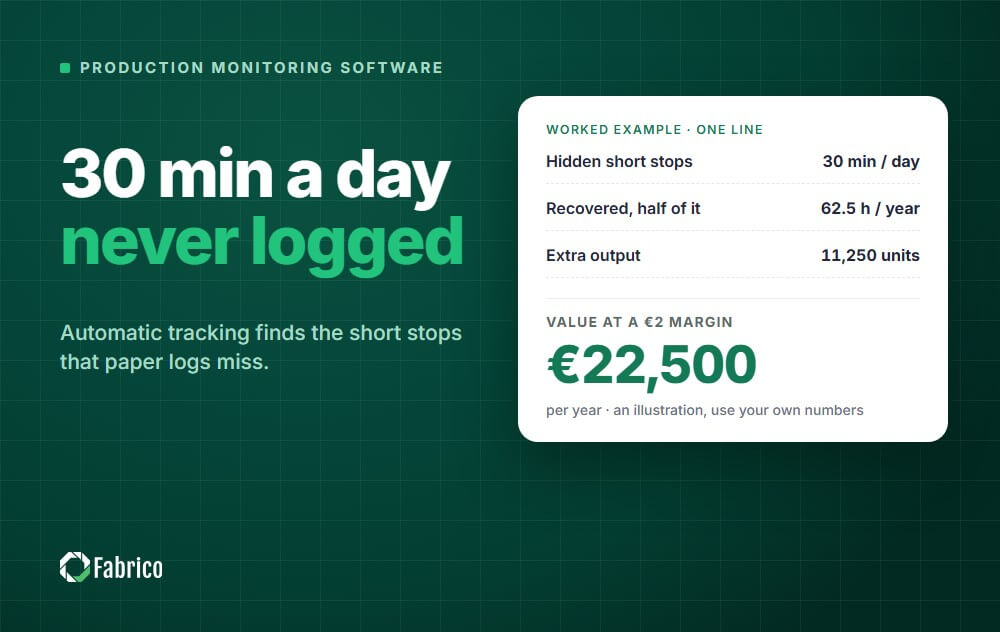
- Ask how short stops are captured. They are often the biggest hidden loss, as our micro stops guide explains.
- Check the OEE math. Ask each vendor to calculate one of your shifts with the standard OEE formula.
- Test the operator screen at the line, including how stop reasons are entered. Our guide to reason code design helps here.
- Decide what happens after a stop: who is alerted, and where the follow-up work is managed.
- Check integrations with your ERP and the data export you need.
- Review hosting and security, including certifications and where the data is stored.
- Agree a pilot with clear success criteria before a wider rollout.
Match the system to the problem
| If your main problem is | Look first at |
|---|---|
| Nobody can say where the time went, or why | A light MES that records stops on connected machines, lets operators tag the cause and turns the data into OEE |
| Operators not seeing the target during the shift | A system with a strong line-side scoreboard |
| Many CNC machines from different builders | A system with native CNC connectivity |
| Many sites to standardize | A system built for enterprise, multi-site rollouts |
| Unique workflows at each station | A configurable app platform |
What good looks like after 90 days
- The bottleneck has a trusted OEE baseline, and nobody argues about the numbers.
- Every stop longer than your threshold has a reason.
- The team has fixed at least two or three top losses, and can show the minutes won back.
For the fixes themselves, see how to reduce machine downtime and how to improve OEE.
How to switch from manual logs: pilot line first
Start with one representative line, ideally the bottleneck. Connect it, measure its losses in money for a few weeks, act on the highest-value ones, prove the recovered value, then extend to the next line with the same rules.
Keep the manual log running beside the pilot for the first weeks, so the team can see that the new numbers match what they already know. With Fabrico, installing and connecting the devices on your machines takes about one month, and the full rollout is complete in 3 to 4 months.
Book a demo to see it on your own lines, or read what Fabrico covers as a light MES. For a wider view of floor software, see our guide to the best shop floor management software.
Sources: each vendor's public website, checked on 16 September 2026, and our own product page for Fabrico, checked on 21 October 2026. Product names are trademarks of their owners.
Features change often, so confirm details with each vendor.
Frequently asked questions
What is production monitoring?
Production monitoring is the real-time tracking of machine and line performance: status, output, cycle times, downtime and OEE. Not sure whether you need monitoring, OEE software or a full MES? Start with production monitoring vs OEE software vs MES.
It usually relies on data from PLCs, sensors or cameras, with operators adding context.
What is the difference between a production monitoring system and MES?
A production monitoring system focuses on what machines are doing and how much they produce.
An MES is usually broader and can also cover scheduling, quality, traceability and work instructions.
Is production tracking software the same as a production monitoring system?
They overlap. Production tracking software records output and job progress, often with operator input.
A production monitoring system also collects machine data automatically.
Can production monitoring work on old machines?
Yes. Retrofit sensors can detect running, stopped and cycle signals on most machines.
Cameras can cover steps that have no electrical signal at all.
How long does it take to set up production monitoring?
It depends on the number of machines, the data source and your IT requirements.
A pilot on one machine or line is the fastest way to find out, and it should come with agreed success criteria.
How much does a production monitoring system cost?
Vendors price in different ways, for example per machine, per site or per user, and some include hardware.
Ask each vendor to quote the same scope so you can compare fairly.
Does production monitoring improve OEE by itself?
No. It makes losses visible, which is the first step.
OEE improves when the team fixes the biggest losses and turns each fix into a standard.
Is a production monitoring system the same as a light MES?
Nearly. A light MES is a production monitoring system that also records stop causes and turns everything into OEE by line and shift, while orders, BOMs and routings stay in the ERP.
Our guide to light MES explains where it stops and when a full MES is needed.
How do I switch from manual production logs?
Connect one line, run the manual log beside it for a few weeks and compare the two. Once the team trusts the new numbers, stop the manual log on that line and move to the next one.
See where your lines lose time, live, on one pilot line.
Request a demoRelated articles












Real Fabrico tiles, sample data.