


 Login
 Blog
MES Software: What It Does, What It Costs to Get Wrong, and How to Choose (2026)

TL;DR
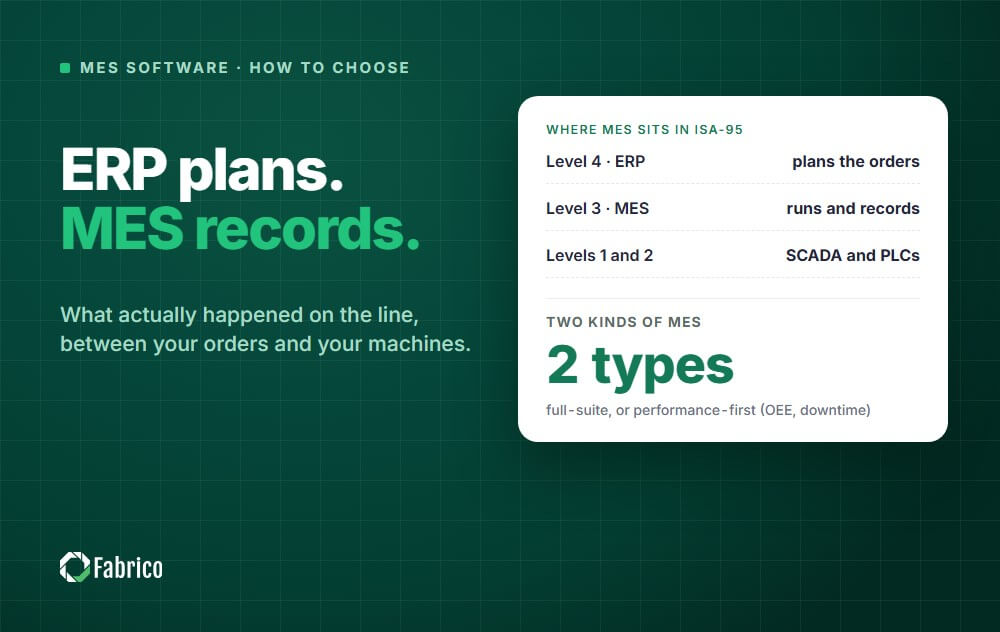
MES software is the execution layer of a plant: it turns the ERP plan into work on the line and records what actually happened. It comes in two broad types: a full-suite MES organised around the production order, and a light MES, also called performance-first, that starts with OEE, downtime and production monitoring.
- How to decide: if your costliest problem is lost time on the line, start with a light MES. If you must prove traceability or batch records, or the daily fight is over what runs next, look at a full suite.
- The costly mistake is paying for functions you will not use for years while downtime, slow running and scrap stay invisible.
- Test every vendor on your own line: data capture, time to first data, operator experience, OEE rules, ERP integration, security and pricing.
- Start with one pilot line, measure it against a baseline, then roll out line by line with the same rules.
Many MES projects start with a question nobody on site can answer with confidence: why did that line lose time yesterday? The ERP shows what should have been made, the whiteboard shows what someone remembered, and the money is lost in the gap between them.
This guide is for the plant, operations or IT lead who has to choose manufacturing execution system software. We sell Fabrico, a light MES, so keep that in mind as you read. The guide compares types of MES and comes to Fabrico only in its own section.
For the textbook definition and the ISA-95 levels, read our guide to what a manufacturing execution system is.
What MES software does
In the ISA-95 model, the MES sits at Level 3, between the ERP that plans orders and the PLCs and SCADA that control machines. Its job is to run production as it happens and keep a record you can trust.
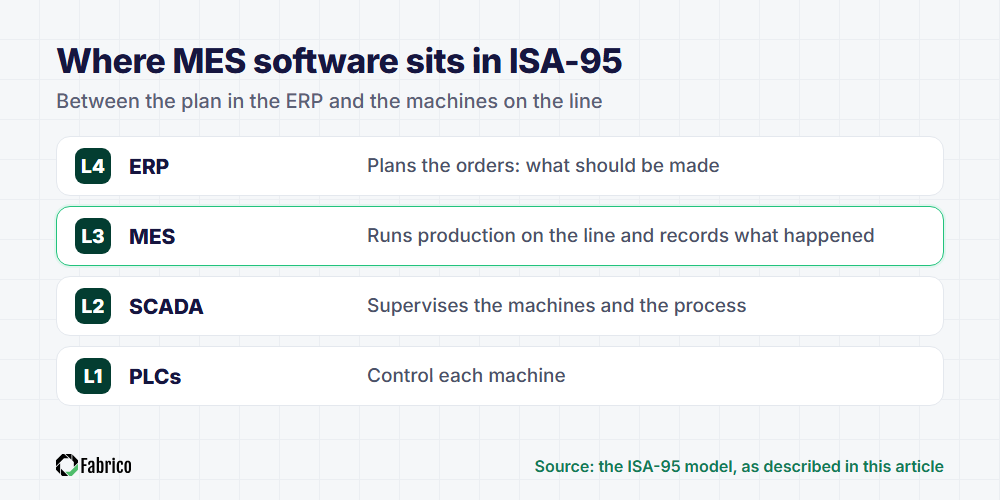
The MESA model describes eleven MES functions. MESA International ceased operations in June 2026 and ISA took on its educational programs and content, but its list of functions is still a useful map. In plain words, they answer four questions.
What is happening on the line right now?
- Data collection: run, stop and count signals from the machines, plus operator input such as the cause of a stop.
- Performance analysis: OEE (overall equipment effectiveness), downtime by cause, speed losses and scrap, by line, machine and shift.
What runs next, and who runs it?
- Scheduling: the order sequence on each line, based on capacity and due dates.
- Dispatching: releasing orders, batches or jobs to a line or workstation.
- Resource and labour management: which machines, tools and people are available, and who is qualified for which job.
Was it made right, and can we prove it?
- Quality management: in-process checks, scrap and rework, recorded against the product and the line.
- Genealogy and traceability: which materials, lots and settings went into each batch or serial number.
- Document control and process management: the right work instruction, recipe or revision at the station, and the steps done in order.
Will the machines keep running?
- Maintenance management: breakdown repairs, preventive work and the history of each machine.
No plant needs all eleven on day one. The useful question is which of these four problems costs you the most today.
If the job is control between the ERP order and the machine, start with what shop floor control does and where it overlaps with MES.
What it costs to get MES software wrong
Failed MES projects rarely fail on features. They fail on the shop floor, in five familiar ways.
- Shelfware. If logging a stop takes too long, operators go back to paper, and the system shows a tidy picture that is wrong.
- Numbers nobody trusts. When stop reasons are typed notes and the OEE rules are hidden, meetings argue about the number instead of the loss.
- A project that never reaches the line. A big-bang scope across every function can spend the budget before one line produces a useful report.
- Integration that breaks. A custom ERP interface without an owner fails at the next upgrade, and the two systems drift apart.
- Stops and repairs in separate systems. Production logs the breakdown in one system and maintenance logs the repair in another, so nobody sees which fix removed which loss.
None of these is a software bug. They are selection and roll-out mistakes, and the losses keep running while they last.
Full-suite MES vs light, performance-first MES
A full-suite MES is built around the production order. It covers scheduling, dispatching, routing, work instructions, quality, genealogy and document control, and usually needs a plant-wide project.
A performance-first MES, often called a light MES or MES lite, is built around the machine and its losses. It starts with data collection, real-time production monitoring, downtime tracking and OEE, and some products keep maintenance in the same system.
Our comparison of eight shop floor control software options covers both kinds.
| Question | Full-suite MES | Performance-first MES |
|---|---|---|
| Built around | The production order | The machine and its losses |
| First value | Enforced, traceable execution | Visible losses with a cause |
| Typical start | Several functions, plant-wide | One pilot line |
| Best fit | Regulated or high-mix plants | Plants losing time and output |
| Main risk | A long wait for the first result | Order-level gaps you fill later |
When a full-suite MES fits
- Regulators or customers require full genealogy or electronic batch records.
- High-mix production makes dispatching, routing and work instructions the daily pain.
- You have the team and the time to change several processes at once.
When a performance-first MES fits
- Your biggest losses are downtime, slow running and scrap, and nobody can rank them by cause.
- Your ERP handles orders well enough, and the blind spot is the line itself.
- Production and maintenance argue about the same breakdowns from separate records.
- You need a proven result on one line before a plant-wide project gets approved.
Many plants start performance-first and add order-level functions later. For the overlap between the two, see how OEE software and MES differ.
What an MES has to cover changes by industry. See what matters on the line in food manufacturing, beverage, packaging, cosmetics, plastics injection moulding, metal fabrication and automotive suppliers.
How to evaluate MES software
A demo on sample data proves little. Ask each shortlisted vendor to show these points on one of your own lines.
1. Data capture from PLCs, sensors and cameras
Walk the pilot line with the vendor and ask how each machine will report run, stop and count. Newer machines usually connect through the PLC, older ones may need an add-on sensor, and manual or hybrid lines need cameras or operator input.
A good answer covers every machine, the old ones included. If your plant already runs SCADA, read where SCADA ends and MES begins before the walk.
2. Time to first data
Ask for the date your pilot line will show live data, not the date the project ends. Then ask what must be ready on your side: network access, PLC access, a stop-reason list and a named owner.
If a vendor cannot name that date before you sign, treat it as a warning.
3. Operator experience
Operators are the main source of stop causes, so test the system with an operator, not a manager. Hand over the tablet in the demo and ask them to tag a stop without help.
Look for short reason lists that fit each machine, large touch targets and the operator's own language. If tagging a stop feels like paperwork, the shift will skip it.
4. OEE math you can check
Ask how the system defines planned production time, whether changeovers count as stops, where the short-stop threshold sits and which ideal rate it uses. Then calculate one shift by hand from the raw stops and counts, and compare it with the dashboard.
If the rules are hidden, two plants on the same software can report OEE figures that mean different things.
5. ERP integration
Agree what moves in each direction. Orders, products and targets usually come from the ERP, and produced quantities, scrap and downtime go back to it.
Ask whether the connector is standard or custom, and who maintains it after an ERP upgrade. Our guide to how MES and ERP split the work shows the usual handoff.
6. Cloud and security
Ask where the data is hosted, which certifications the vendor holds and who can see your data. ISO/IEC 27001 is the common certification for information security.
Also ask what happens at the line when the internet drops, and how you would export all your data if you left. Our comparison of cloud-based MES systems puts several options side by side.
7. Pricing model
MES quotes are hard to compare because vendors charge by different units. Ask these questions first.
- Is the price per site, per line, per machine or per user?
- What is included: connection hardware, sensors or cameras, implementation, training and support?
- What does each extra line or site cost once the pilot works?
- Are operators and technicians charged as users?
- What is the minimum term, and what does it cost to leave, including a full data export?
A checklist to take into vendor demos
This is the short version. For questions and a scorecard, use our MES software demo checklist.
| Area | What a good answer looks like |
|---|---|
| Data capture | A named method for each machine: PLC, sensor, camera or operator input |
| Time to first data | A dated plan for live data, with tasks on both sides |
| Operator experience | An operator tags a stop in the demo without help |
| OEE math | Written rules, and a hand calculation that matches the dashboard |
| Maintenance | A technician opens a work order from a logged stop without retyping |
| ERP integration | What flows each way, and who owns the connector after upgrades |
| Cloud and security | Hosting region, certificates, access rules and a plan for network loss |
| Pricing | A full pilot quote and a price for every line after it |
An MES implementation plan: pilot line first
The safest MES project proves value on one line before it touches the rest of the plant.
- Step 1: pick the pilot line. Choose a line with expensive, visible losses and a supervisor who wants the change.
- Step 2: set the baseline. Write down the OEE rules and measure the line as it runs today.
- Step 3: connect and configure. Connect the machines, build the stop-reason list with the operators and train every shift.
- Step 4: review losses every day. Production and maintenance review the top losses together and fix reasons that do not match reality.
- Step 5: decide on evidence. Compare the pilot with the baseline, then agree in writing what the roll-out must deliver.
- Step 6: roll out line by line. Reuse the reason lists and settings, keep the same OEE rules everywhere and give each site one owner.
The pilot is finished when the data is complete, operators and technicians use it every shift, and the targeted loss is smaller than the baseline. Until then, adding lines only multiplies the problems.
What drives MES implementation cost
MES implementation cost depends less on the licence line than on the scope you ask the system to cover. Before you compare quotes, write down these six drivers for your plant, because they decide most of the total:
- Scope. A performance-first MES that tracks OEE, downtime and production counts is a smaller project than a full suite that also runs scheduling, quality, genealogy and labour.
- Machines and lines. How many machines you connect, and how many have a PLC you can read, against older equipment that needs a sensor or a camera.
- Integration. Interfaces to ERP for orders and to existing quality or maintenance systems add work on both sides. Ask who builds each interface and who maintains it after the next upgrade.
- Deployment. A cloud (SaaS) MES moves servers, updates and backups to the vendor and turns the cost into a subscription; an on-premise MES keeps them with your IT team.
- Hardware. Edge devices, sensors, cameras and operator tablets, and who installs them.
- People and change. Operator training, reason-code design and the weekly routine that turns the data into actions.
Ask every vendor to price the same pilot line, so the quotes compare like with like, and to show what changes when you add the next ten machines. For cost, time and team by plant size, read MES implementation cost. To scope your own lines, book a demo or contact us.
Who uses MES software, and what each person sees
- Operators work from the production line screen: output against target hour by hour, a "line is down" card when the machine stops, and a two-tap stop reason.
- Shift leads watch the overview, one card per line with status and OEE, and the TV status screen on the shop floor.
- Plant and production managers use OEE analytics: availability, performance and quality over time and the top stop reasons by line and shift.
- Planners follow production achievement, good output against the plan, per line and shift.
- Maintenance gets a task when a stoppage reason is configured to open one automatically, and people can also create tasks by hand.
- Group operations compare plants on the same OEE definition in group analytics.
Where Fabrico fits
Fabrico is a cloud-based MES and OEE platform for manufacturers, with maintenance management (CMMS) built in. In the terms of this guide, it is a light, performance-first MES.
- Automatic downtime tracking: the machine monitoring software logs stops automatically from the PLC, an IoT sensor or a camera, and cameras recognise when a manual or hybrid line stands still. Supported protocols: OPC UA, Modbus, PROFIBUS, PROFINET, MQTT, EtherNet/IP, EtherCAT, IO-Link and HTTP.
- Stop causes from the floor: in the downtime tracking software, the operator tags the cause of a stop on a tablet, and on lines with a camera, Inefficiencies Zoom-In links a stop to the video of that moment. AI cameras can suggest a likely reason, and the operator confirms it.
- Live OEE: the OEE software gives real-time production monitoring, with OEE live by line, machine and shift.
- Maintenance as a complement: a stoppage reason can be configured to open a maintenance task automatically in the built-in CMMS, and people can also create tasks by hand on a phone or tablet. Preventive work runs from recurring calendar templates.
- AI: the AI Assistant answers from manuals and maintenance history; an AI Agent is planned, not live.
Where Fabrico does not fit
Production planning and scheduling are on Fabrico's roadmap, not in the product today. If detailed scheduling is the first function you need, a full-suite MES is the better fit for now.
As a light MES, Fabrico leaves genealogy, routings and bills of materials in your ERP. If you need those inside the MES, look at a full suite, and see what a light MES leaves out.
Fabrico is cloud software with no offline mode, so it needs a working connection at the line. If the link is lost, the gateway can store machine data offline for up to 30 days, with automatic recovery within 72 hours by default. There is also no formal root cause workflow: the data supports your team's own analysis.
Results, rollout and security
Published customer results include 20% less downtime at ABB, and factory-wide OEE up from 53.1% to 59.6% at Ficosota.
For OEE with hardware, connecting the machines takes about a month and the full rollout 3 to 4 months. Fabrico is built in the EU, hosted on AWS in an EU region and certified by DNV to ISO/IEC 27001, ISO/IEC 20000-1 and ISO 9001; it is also a G2 Leader for 2025.
Want to see live OEE, stop causes and work orders in one system? Book a demo.
Frequently asked questions
Is an MES system the same as MES software?
Yes. In practice both terms describe a manufacturing execution system: MES software is the application, and MES system often also covers the sensors, connections and integrations around it.
How much does MES software cost?
It depends on the pricing unit (site, line, machine or user), the hardware needed to connect machines and the implementation work. Ask for a quote that covers a pilot line end to end and the price of each extra line.
How long does an MES implementation take?
It depends on scope. A full-suite project covering orders, genealogy and document control across a plant is usually measured in months, while a performance-first MES can show live data from a pilot line much sooner.
With Fabrico, for example, connecting the machines takes about a month, and a full rollout takes 3 to 4 months.
Can MES software connect to old machines without a PLC?
Yes, if the vendor offers more than one way to capture data. A machine without a usable controller can take an external sensor, and lines with no machine signal can use cameras or tablet entry.
Is cloud MES software secure enough for a factory?
It can be, but check rather than assume. Ask for the hosting region, the vendor's certificates, the access rules for your data and the plan for a network outage.
Does MES software include production scheduling?
Full-suite MES products usually include detailed scheduling and dispatching; performance-first products often start without them. Fabrico does not include production scheduling today: planning and scheduling are on its roadmap.
Related articles
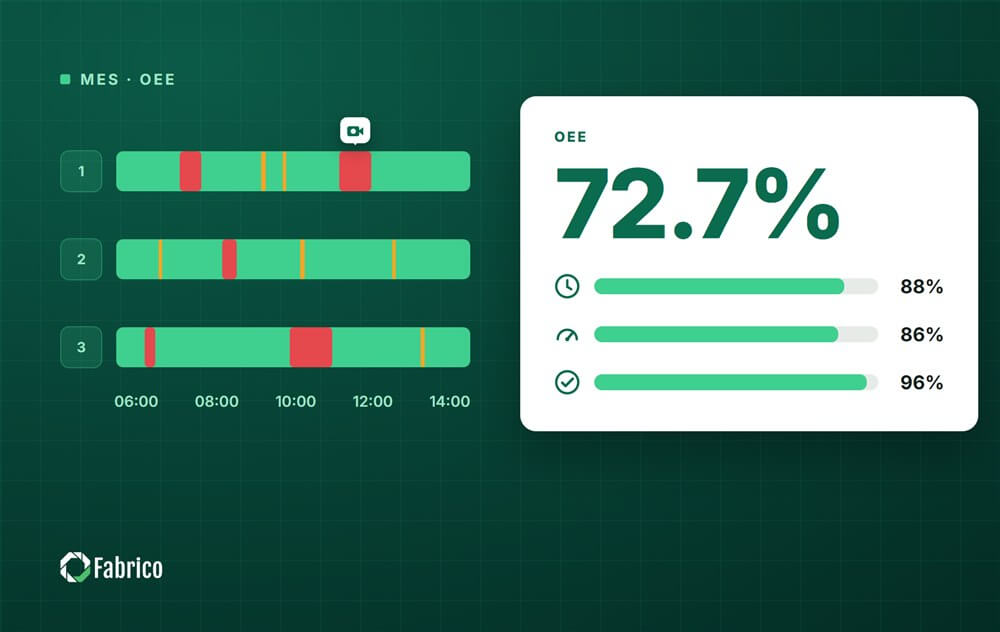
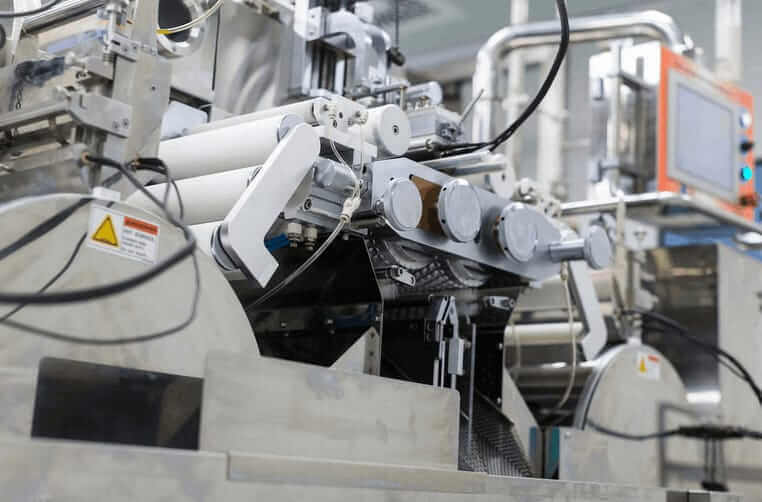












Real Fabrico tiles, sample data.