


 Login
 Blog

Computer Vision for Solar Panel Manufacturing: Layup to Pallet

In short: on a module line, computer vision for solar panel manufacturing pays off as a counter, and as a record you can replay, at the stations your PLC and MES miss: manual bussing, trimming and framing on semi-automatic lines, hand potting of junction boxes, the repair table, and packing and palletizing.
- EL imaging, visual inspection and the flash test are inspection and test systems. Fabrico does not do them; their fail results can feed the quality part of OEE.
- Stringers, layup robots, laminators and testers have PLCs, and larger lines read a serial barcode at EL, flash test and packing. Use those counts first.
- Module line losses hide in laminator waits, format changes, material waits for glass and frames, stringer short stops and the repair loop.
- With Fabrico, the camera add-on counts modules at the repair table, framing and packing; a click on the shift timeline streams that minute of video, and the line operator enters why the line stopped.
A modern module line is one of the most automated assembly lines you will find. Stringers solder cells into strings, a robot lays them up, the laminator runs its recipe, and the flash tester measures the power of each module. On larger lines, a serial barcode follows the module from layup to the pallet.
The gaps sit between the machines: the repair table, manual bussing, a semi-automatic framing press, the packing end, and smaller lines with no MES.
Wafer and cell fabs run automated tools tied to their own host systems, so they are out of scope here.
Station by station, it says where a camera count adds something, where the stringer PLC or the serial scan already does the job, and what to ask a supplier.
The industry is large and concentrated. The Fraunhofer ISE Photovoltaics Report of 14 July 2026 says that in 2025, approximately 96% of solar modules and their components came from Asia, and that silicon wafer-based technology made up about 98% of total production. The IEA's 2022 report on solar PV supply chains put China's share in all the manufacturing stages of solar panels above 80%.
In Europe, SolarPower Europe said in its September 2025 study with Fraunhofer ISE on reshoring solar manufacturing that, with the right policies, Europe can competitively deliver 30 GW of solar manufacturing by 2030, and its cost gap analysis assumes solar factories reaching 3 to 5 GW of capacity.
Computer vision for solar panel manufacturing: inspection cameras and counting cameras
A module maker hears "computer vision" from two kinds of supplier. EL and visual inspection stations judge the module: cracks, solder joints, bubbles, alignment. An OEE camera judges nothing; it counts modules and pallets and lets you look back at a stalled station.
| Job on a module line | Inspection or test system | OEE camera |
|---|---|---|
| Cell cracks, solder faults | Yes, EL imaging | No |
| Bubbles, foreign bodies, misalignment | Yes, visual inspection | No |
| Power class, IV curve | Yes, the flash tester | No |
| Count modules or pallets | Only modules that pass through it | Yes, including at hand stations |
| Why the framing press stood | Defect images only | Video of the station for that minute |
| What it gives OEE | Grade and fail results per serial | Modules counted per hour |
Keep the EL testers, visual inspection and the flash tester as they are. A module downgraded or scrapped at test belongs in the quality figure, taken from the tester log or the MES, so it is not counted twice. For the same split on other machine types, see which machines need a camera and which a sensor.
Module line losses: laminator, stringer, repair loop, packing
The US Department of Energy's solar manufacturing page lists what goes into a module: wafers, cells, encapsulant, glass, backsheets, junction boxes, connectors and frames. Apart from wafers, which stay in the cell fab, any of them can run short at a module station.
The laminator often sets the pace
On many lines the laminator, or the bank of laminators, is the bottleneck. It cures a batch of modules under vacuum and heat in a cycle measured in minutes, and a load it misses is capacity gone for the shift. When the laminator waits, the cause usually sits upstream: no strings from the stringer, a fault at layup, or a queue at the EL tester.
Read cycles and recipe from the laminator's PLC. The PLC cannot tell you why the infeed sat empty for twelve minutes; the layup end on video for those minutes can. Having the camera add-on flag a starved laminator by itself is on the Roadmap, not live, so for now the laminator operator picks the reason on the tablet.
Stringer short stops
Stringers and tabbers stop for short reasons: a ribbon spool change, a broken cell, a string out of line, a solder or flux problem. Most last a minute or two and rarely reach a stop sheet. The stringer PLC already logs them, so pull those states into OEE instead of mounting a camera.
Format changes
The same Fraunhofer ISE report notes that wafer sizes have increased and that, with the same number of cells, larger modules now reach a power range of up to 750 W per module. A change of cell size, cell count, glass size or frame means new recipes, new film widths and new frames at the line.
Treat each switch, say from 108-cell to 132-cell glass-glass modules, as a planned changeover with its own code and a target time per format pair, then track the minutes over target. The method is in changeover time.
Material waits
These materials reach the line in batches. When the frame cart is empty, framing stops and laminated modules queue in the buffer.
Log "frames not delivered", "glass short" and "encapsulant roll change" as their own reasons, apart from breakdowns, so a supply problem shows up as one.
The repair loop
When pre-lamination EL finds a cracked cell or a bad solder joint, the module goes to a repair table. People replace the faulty cell or string and send the module back for a new EL image. After lamination, repair options are limited, so a fault usually means a lower grade or scrap.
On a serialised line, the MES shows which serials went to repair, but rarely how long they sat there or how many came back each hour. A camera pays off here.
Manual stations on smaller lines
Smaller and older lines often lack the bussing, framing and junction box robots of large lines. Manual bussing and backsheet placement, edge trimming by hand, a semi-automatic framing press, and junction box gluing and potting by hand, with a cure buffer before test, still run on many lines built for lower volumes or special formats, such as building-integrated or custom-size modules.
These stations have people and often no count, so a camera earns its place most clearly here. See computer vision for OEE in manual assembly.
Sorting, packing and palletizing
After the flash test, modules are sorted by power class, stacked on pallets per class, then strapped and wrapped. Sorting by class means several open pallets at once. On many lines this end is manual, its stops back up into testing, and short ones rarely get written down.
Here a camera counts modules as they go onto each power-class pallet, or full pallets as they leave, and shows the end of line when stacking falls behind. Automated stackers are covered in palletizer downtime and cameras, and a crew packing by hand in OEE at a manual packing station.
Glass, glare and robot cells
Module glass acts as a mirror under hall lighting. Put OEE cameras outside the guarding of layup and framing robots, tilt them so the glass does not throw the roof lights back into the lens, and get safety's sign-off on each spot. Angles and light are covered in where to mount a production line camera and how to light it.
Stringer to pallet: where each number comes from
On a line with MES serial scans at the test and packing steps, the scans are the count, and a camera mainly adds video at the manual stations. On a line without them, a camera fills the count gaps.
PLC, tester log, serial scan or camera: the station table
| Module line station | Where the count comes from today | Camera add-on adds |
|---|---|---|
| Cell loading, cell cutting | Tool PLC, cell box scan | Nothing. Use the signal. |
| Stringer, tabber | Stringer PLC: strings and stops | Little. Read the short stops. |
| Layup, bussing | Layup robot PLC, serial label | Count where bussing is manual |
| Pre-lamination EL | Its own pass and fail result | Nothing. Repaired modules are rework, not scrap. |
| Laminator | PLC: cycles and recipe | Video of the infeed during waits |
| Trimming, framing | Framing PLC on automated lines | Count at manual or semi-automatic stations |
| Junction box, potting | Robot PLC on larger lines | Count where it is done by hand |
| Flash test, final EL | Tester log, serial scan | Nothing. Feed fails to quality. |
| Hipot, insulation test | Tester log, serial scan | Nothing. Feed fails to quality. |
| Repair table | Often loose, or nothing | Count of repaired modules sent back |
| Sorting, packing | MES scan, if there is one | Count of modules or pallets, video of stalls |
| Why a station stopped | Line operator or shift lead, tablet or phone | The minute on video, when a reason is argued |
A large line that scans serials at layup, EL, flash test and packing may need two or three cameras at most, at the repair table and the hand stations. The card below marks them.
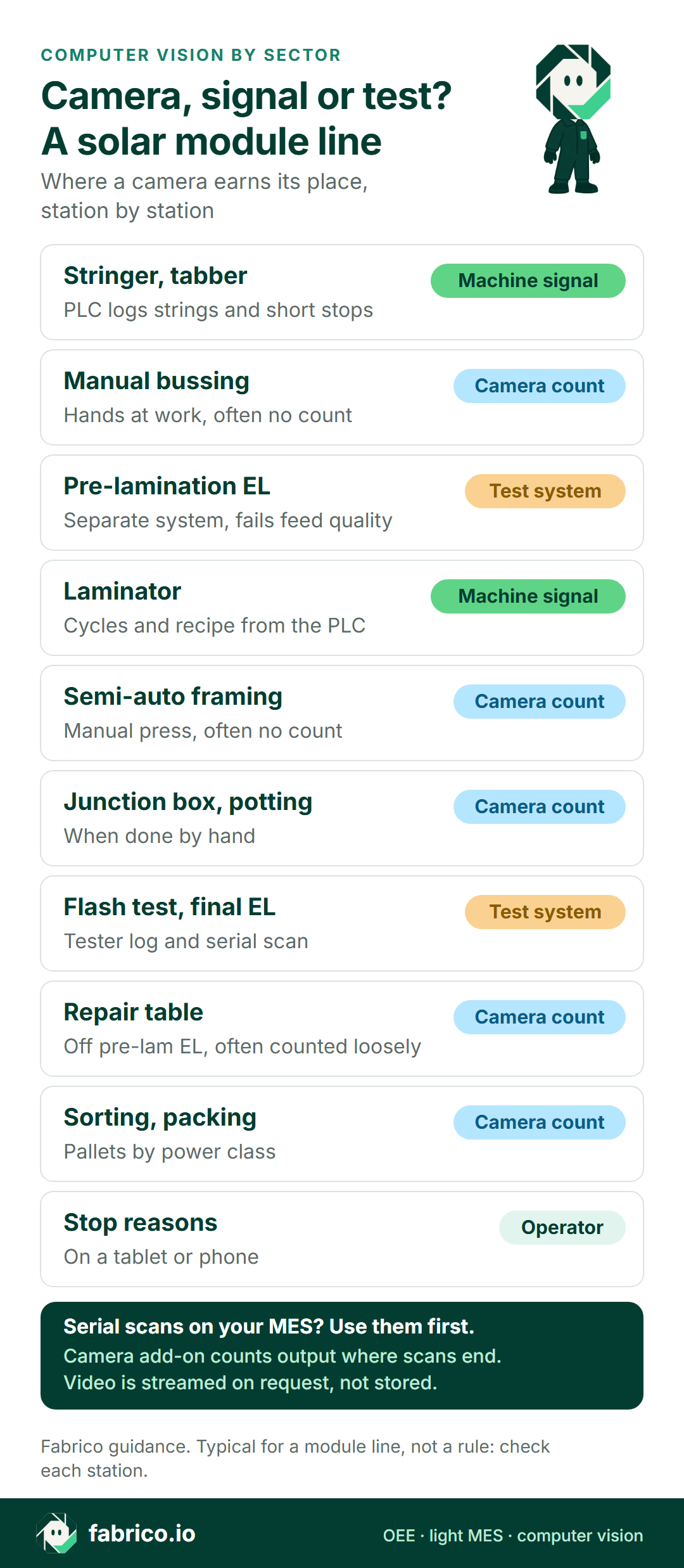
Text version of this infographic
- Stringer and laminator use their machine signal
- Pre-lamination EL and flash test stay separate test systems
- Manual bussing
- Semi-automatic framing
- Junction box potting
- The repair table and packing get a camera count
- Operators add stop reasons
Worked example: a semi-automatic line with no MES
The figures are made up for illustration. Picture a semi-automatic module line without MES, running two 12-hour shifts a day. The laminator sets the ideal rate at 1 module a minute, so a 720-minute shift could make 720 modules at best.
Run state comes from the laminator PLC. The flash tester writes its own log on a standalone PC, which someone exports after the shift. A camera add-on above the packing end counts each module laid on a pallet, so every hour of the night shift has its own figure.
The line stood for 150 minutes: 50 waiting for frames and glass, 40 on a switch to a larger format, 35 in stringer short stops and 25 on one laminator vacuum fault. That leaves 570 running minutes out of 720, an availability of 79.2%.
In 570 minutes the laminator could have fed 570 modules to test. The tester log has 520, a performance of 91.2%. The missing 50 are slow running, and the hourly packing count puts most of them between 02:00 and 05:00, when the layup crew was one person down.
The camera add-on counted 505 A-grade modules onto pallets, the same as the tester's passes. Fifteen failed flash test or final EL and went to B-grade or scrap: quality is 97.1%.
OEE: 79.2% x 91.2% x 97.1% = 70.1%. The packing count gives the same answer directly: 505 good modules out of a possible 720 is 70.1%.
Frames and glass cost twice as many minutes as the laminator fault, and under a catch-all "other" code nobody would have seen it. Where serials are scanned at flash test and packing, take the count from those scans and keep the camera add-on for the repair table and for video of packing stalls.
Eight questions for a solar camera or OEE vendor
Put these to each supplier, and to us, using last week's flash tester log and one shift of stop sheets.
| Ask | How to test the answer |
|---|---|
| How do you use MES and serial scan data? | Ask for the serial scans at EL, flash test and packing to be the count, with cameras only at stations outside the scan flow. |
| How is the laminator pace set? | Ask to set the ideal rate from the laminator cycle and load size, by format. |
| How do test results get in? | Ask how a B-grade or scrapped module from the tester log lands in quality, and that it is not counted again at packing. |
| Does it count modules, strings or pallets? | Run it beside the flash tester log for one shift; the two counts should agree module for module. |
| How is a format change booked? | Ask for a planned changeover code per format pair, with the minutes over target shown for each switch. |
| How does the repair loop show? | Ask how modules sent to repair and sent back are counted, and how long they waited. |
| Where do cameras go near layup and framing robots? | Ask for a drawing with each camera outside the robot guarding and angled off the glass, signed off by safety. |
| Who can open repair table video? | Ask whether video is kept at all, where, for how long, and which roles at the plant can open it. |
Start with one module line and one shift pattern; the steps are in our computer vision OEE pilot guide. A side-by-side of camera platforms is in computer vision software for manufacturing OEE, and stringer short stops versus slow running in reduced speed loss vs minor stops.
Cameras at the repair table and packing end
The repair table, manual bussing and the packing end have people at them for the whole shift, so a camera there will catch hands and sometimes faces. Brief both shift crews first. In much of Europe the works council has a say before a camera is fitted, so take the camera plan to it early.
Point the repair table camera at the module on the table and the packing camera at the pallet, not at the repairer or the packers, and report by line and shift only. Ask each supplier which privacy masking works today on a bright, reflective module and which is still planned.
The camera add-on counts modules and pallets; it has no use for who repaired or packed them. The full checklist is in production line cameras without surveillance.
Where Fabrico fits
Fabrico is cloud OEE and light MES software. On a module line it puts stringer and laminator states, fail counts from test and camera add-on counts from the hand stations into one view per shift.
- Stringer and laminator: cycles, run state and stops are read from each machine's PLC; a retrofit sensor or counter covers any machine without a usable port.
- Why the line stood: the line operator or shift lead picks the reason on a tablet or phone, for example frames not delivered or a laminator vacuum fault.
- Shift results: OEE per line and shift, downtime by cause and lost modules shown as money, on the web, iOS and Android.
- Camera add-on, on request: it counts modules at the repair table, manual bussing and framing, junction box potting and packing, and on any machine with no usable signal. Click a moment on the shift timeline and the add-on streams that station's video; in the standard setup no video is stored in Fabrico.
- Data out: counts, stops and reasons can go to the MES or ERP through the REST API or webhooks, or out as an Excel or CSV export.
Roadmap, not live today: the camera add-on detecting stops by itself, flagging a starved laminator infeed, and suggesting a stop reason.
What Fabrico does not do: it does no inspection or testing of modules. EL imaging, visual inspection, flash test and hipot stay with your test systems, and their fail counts can feed Fabrico's quality figure. It does not run or set recipes on the stringer, the laminator or the tester.
The product page is Fabrico computer vision for OEE. How a packing count becomes an OEE figure is in OEE with computer vision, and a wider look at the market in our guide to OEE software.
Send us your line layout from stringer to packing before a demo, and we will mark which stations the add-on would count and which already report through a PLC or a serial scan.
What people ask next
Can a camera find cracked cells in solar modules?
Yes, but that is an EL inspection system, not an OEE camera. Cell cracks, soldering faults and power class are found by EL testers, visual inspection and the flash tester. Fabrico does not do module inspection. Their fail results can feed the quality part of OEE.
If a line already scans a serial at each step, are cameras needed?
Often only a few. Use the serial scans as the count wherever modules are scanned in and out. Cameras earn their place at stations outside the scan flow, such as the repair table, manual bussing or packing, and where you want video of what happened at a stop.
Which station on a module line should get the first camera?
In most cases the repair table, or a packing end staffed by hand: modules pass through both with no reliable count. Semi-automatic framing and hand potting come next. On a whole line without MES, start at packing so each shift has one count it trusts. Stations with a PLC or a serial scan you trust come last.
How do you set the ideal rate on a module line?
Start from the bottleneck, which is often the laminator: modules per load divided by the cycle time, set by format. Rate the line against that, not against the top speed of the stringer.
Want to test this on a module line? Bring one week of flash tester logs to a demo, and we will work through a shift of them with you.














Real Fabrico tiles, sample data.