


 Login
 Blog
Siemens Opcenter vs AVEVA MES: Two MES Paths Compared by Job

In short: Siemens Opcenter vs AVEVA MES is a choice between two MES families with different starting points. Siemens describes Opcenter as a manufacturing operations management portfolio that links engineering data in PLM to automation, with separate MES variants per industry. AVEVA describes its MES as a composable, hybrid cloud product with a frontline operator interface and native integration for AVEVA System Platform.
- Scope: Opcenter spreads MES, quality, scheduling and intelligence across named products; AVEVA MES groups execution, inventory, genealogy, OEE and quality in one product page.
- OEE: both vendors' pages describe OEE measurement; ask each vendor how stoppage and count data reach it from the line.
- Deployment: Opcenter X is offered as SaaS, VPC or on premises; AVEVA MES runs on premises or as a hybrid cloud.
- Reviews: most compare brands, not products, so check which product and which plant type each review covers.
- Facts from siemens.com and aveva.com as of 14.11.2026, linked in place.
People who type "Siemens vs AVEVA" into a search box usually have an MES project on the table and two large names on the shortlist. The useful comparison is not a star rating. It is which product each vendor would actually put on your floor, what that product records, how it reaches the machines, and where it runs. This page answers those questions from each vendor's own pages, then routes the decision by first job in a decision matrix and prices a sample shift's losses in euros. Fabrico's own cloud OEE and light MES software is covered separately, after the decision matrix, for readers who want an OEE layer beside the MES.
Key takeaways
- Name the product, not the brand: "Siemens" can mean six Opcenter Execution variants or Opcenter X, and "AVEVA" can mean AVEVA MES, System Platform or both.
- Opcenter's own framing starts from engineering data in PLM; AVEVA's framing starts from the operator interface and the automation layer.
- Both vendors describe OEE and SPC, so the test is how stop minutes get a reason, not whether a KPI screen exists.
- Write down where the system must run (cloud, hybrid, on premises) before the first demo; it narrows the product choice on both sides.
- Price your current waits for lab release and changeover in euros before the pilot, so both vendors are judged on the same number.
Siemens Opcenter vs AVEVA MES at a glance
Checked against siemens.com and aveva.com on 14.11.2026; every cell comes from a vendor page linked further down.
| Job | Siemens Opcenter | AVEVA MES |
|---|---|---|
| Own description | A unified manufacturing operations management (MOM) portfolio | MES software with a composable frontline operator interface |
| MES product | Opcenter Execution in six industry variants, plus Opcenter X for small and mid-sized firms | AVEVA Manufacturing Execution System, formerly known as Wonderware MES |
| OEE | Opcenter Execution Foundation OEE; Opcenter Intelligence dashboards | Real-time OEE KPIs and schedule adherence |
| Quality | Opcenter Quality (QMS); LIMS link for batch sampling | Automated sample plans and SPC rule checks |
| Recipes and materials | Formulas, recipes and BOMs through specification management | BOM and pre-weight recipes enforced; genealogy |
| Scheduling | Opcenter APS: planning and scheduling products | Plant schedules and job execution on live inventory data |
| Deployment | Opcenter X via SaaS, VPC or on premises; Intelligence in the cloud or on premises | On premises or hybrid cloud, with services on CONNECT |
| Group | Siemens product portfolio | Member of the Schneider Electric group |
What Siemens Opcenter offers
Siemens' Opcenter page says "Opcenter is a unified manufacturing operations management (MOM) solutions portfolio, enabling digital software operations management." It places that layer between design and the line: "MOM is the real-time software layer that links product lifecycle management (PLM) to automation, connecting the virtual world of product development with the real world of production." The same page lists capability areas for manufacturing execution, quality management, production planning and scheduling, and enterprise manufacturing intelligence. As of 14.11.2026:
- Execution, by industry. The Opcenter Execution page lists six MES variants: Discrete, Process, Electronics, Medical Device and Diagnostics, Pharma and Semiconductor. It says "MES functionality enables forward and backward traceability of components and their use within each end product" and that the systems "provide up-to-the-minute reporting of actual manufacturing operations and compare historical and expected results."
- Process plants. The Opcenter Execution Process page speaks to "consumer packaged goods (CPG), food and beverage (F&B) and chemical manufacturing," including packaging, labeling and palletizing. It pairs the MES with a specification management system for "formulas, recipes and bills of materials (BOMs)" and says to "Closely tie MES with laboratory information management system (LIMS) software to manage frequent batch sampling and laboratory testing." It also describes a "measured, incremental, layered approach" for plants moving off legacy systems.
- Discrete plants. The Opcenter Execution Discrete page says it "simplifies complex change management" across engineering or production change orders, work orders and affected materials, and covers labor management with augmented and virtual reality tools.
- OEE. The Foundation OEE page says engineers can "Easily generate plant engineering algorithms, time models, reason trees and state transition table (STT) calendars," and that the product "calculates OEE and makes this information visible to all stakeholders." It "supports Opcenter Execution Discrete and Opcenter Execution Process MES software."
- Intelligence. The Opcenter Intelligence page offers a view of "machine, line and plant performance in near-real time" and KPI dashboards with "real-time visibility into current downtime causes." Its manufacturing data warehouse is described as "based on the ISA-95 international industry standard," and it comes as Opcenter Intelligence Cloud or On-Premises.
- Scheduling. On the Opcenter APS page, "Opcenter Scheduling software creates production schedules based on availability of resources, constraints and materials required by the order."
- Opcenter X. The Opcenter X page presents modular SaaS manufacturing software for small and medium-sized businesses, with order management, track and trace and non-conformance management, and an interface layer "supporting key protocols like NATS, MQTT, OPC UA, File System, and HTTP." Its MES modules are "available via SaaS, VPC, and On-Premises."
The Opcenter OEE functions get a closer look in the Siemens Opcenter OEE review; this page stays on the head-to-head with AVEVA.
What AVEVA MES offers
AVEVA's MES product page says the product helps plants "Quickly transform plant operations with a composable frontline operator interface and a modular deployment approach." As of 14.11.2026, AVEVA's own System Platform page lists the product as "Formerly Known As Wonderware MES", and the About AVEVA page notes that "Schneider Electric completed its acquisition of AVEVA and AVEVA is now a member of the Schneider Electric group." What the product page sets out:
- Composable build. The MES page offers "low-code/no-code workflow and user experience modeling tools" and "plug-and-play use case libraries," which its FAQ calls "ready to use modular packaged business capabilities (PBCs/ Use Case Libraries)".
- Execution and inventory. It says to "Manage plant schedules and job execution with up-to-date production and inventory information" and to "Enforce bill of material (BOM) and pre-weight recipes to reduce out-of-spec products."
- Genealogy. "Track the transformation of materials into finished products across storage and production locations on the shop floor."
- OEE and quality. "Measure and monitor OEE KPIs" sits beside schedule adherence, both shown live, with a promise to "Quickly respond to events to minimize downtime". On quality: "Automate quality sample plan execution. Apply Statistical Process Control (SPC) methods to identify limit and rule violations."
- Workflows and forms. The MES page says it "integrates and includes" AVEVA Work Tasks.The Work Tasks page describes mobile apps for iOS, Android and Windows that download assigned tasks so they can be "viewed and executed on and offline in the event of loss of connectivity".
- ERP link. AVEVA Enterprise Integration "automates the exchange of production planning and results data between your manufacturing execution system and business applications," and the page says it keeps plant operations running when a business application is offline.
- Where it runs. "Use AVEVA Manufacturing Execution System on premises or through a hybrid-cloud deployment." The hybrid model keeps workflow and quality control on the plant's edge and adds multi-site services on CONNECT, AVEVA's industrial intelligence platform.
- Automation layer. The MES manages data collection on automated processes "with native integration for" AVEVA System Platform. The System Platform page says it can "Exchange data bidirectionally through MQTT and publish the System Platform plant model" and that "System Platform provides the operational layer for visualization, control, and data integration, while MES manages production workflows and execution."
The AVEVA MES FAQ names a fit with "flexible multi product make-to-order or make-to stock production processes in industry segments like food and beverages, consumer goods, specialty chemical". AVEVA is compared with other suites in AVEVA vs Proficy and, on the SCADA side, in ICONICS vs AVEVA.
Siemens vs AVEVA reviews: how to read them as an MES buyer
Review sites often file entries under the brand, and both brands cover far more than MES. A Siemens review may describe Opcenter Execution Discrete in an assembly plant, Opcenter X at a small firm, or a different Siemens product entirely. An AVEVA review may be about AVEVA MES, System Platform, an HMI or a historian. Averaging those into one score tells a food or chemicals plant very little about the MES it would buy.
Three filters make reviews useful. First, keep the reviews that name the exact product and version you are evaluating. Second, keep the reviews from your plant type: a review from a semiconductor fab says little about a filling hall. Third, separate the product from the project. MES go-lives depend heavily on the system integrator, the scope and the data model, so a complaint about a slow project is often a complaint about scope, not software. AVEVA's about page mentions "the support of over 6,000 system integrators and OEM partners", so the integrator in a review is part of the story too.
Then do what reviews cannot do for you: ask each vendor for a reference plant that matches your process type and runs the product you are being sold, and ask that plant how stop minutes, lab holds and changeovers are recorded today. If you are also weighing a lighter route, light MES vs full MES sets out the trade-offs, and the MES software guide widens the field.
Opcenter vs AVEVA MES, job by job
Choosing the product. With Siemens, the first decision is which Opcenter product you are buying: an industry variant of Opcenter Execution, or Opcenter X as modular SaaS. With AVEVA, the MES is one named product whose modules are composed per plant, usually alongside System Platform. Get each vendor to name the exact product, modules and version in writing before any workshop, so the rest of the comparison is like for like.
Engineering link. Siemens frames MOM as the link from PLM to automation, and the Discrete page leans on change orders flowing to work orders. That matters when product definitions change often and live in an engineering system. AVEVA frames its MES around operator tasks, use case libraries and low-code workflows, which matters when the plant wants to shape screens and procedures itself.
Recipes, materials and quality. On a process line, both pages cover recipes and BOMs, material genealogy and SPC. Opcenter Execution Process ties the MES to a LIMS for batch sampling; AVEVA automates sample plan execution inside the MES. Give both the same recipe with one raw material swap and one out-of-limit lab result, and watch where the hold appears and who releases it.
OEE. Foundation OEE describes time models, reason trees and state transition calendars set up by engineers; AVEVA describes live OEE KPIs next to schedule adherence.Both are real configuration work. Ask each to show how a 4 minute capper jam is classed, who types the reason, and how unclassified time is shown at the end of a shift.
Reaching the machines. AVEVA routes machine data through native integration with System Platform, which models assets as reusable templates. Opcenter X lists NATS, MQTT, OPC UA, File System and HTTP for its interfaces, and Opcenter Intelligence says it connects to Siemens, third-party and proprietary systems. If the plant's PLCs and SCADA are a mix of brands, list the five machines that matter most and ask both vendors to say how each one connects.
Scheduling and ERP. Opcenter has a separate APS family for constraint-based scheduling. AVEVA MES manages plant schedules against live inventory and exchanges planning and results data with business systems through Enterprise Integration. Decide whether finite scheduling belongs in the MES project at all; many plants keep it in the ERP or a planning tool for the first phase. The ERP vs MES guide covers that boundary.
Where it runs. Opcenter X is SaaS first, with VPC and on-premises options; Opcenter Intelligence comes in cloud and on-premises editions. AVEVA MES runs on premises or as a hybrid, keeping execution on the plant edge and multi-site analytics on CONNECT. IT and OT security teams should see both architectures drawn on one page before the shortlist closes.
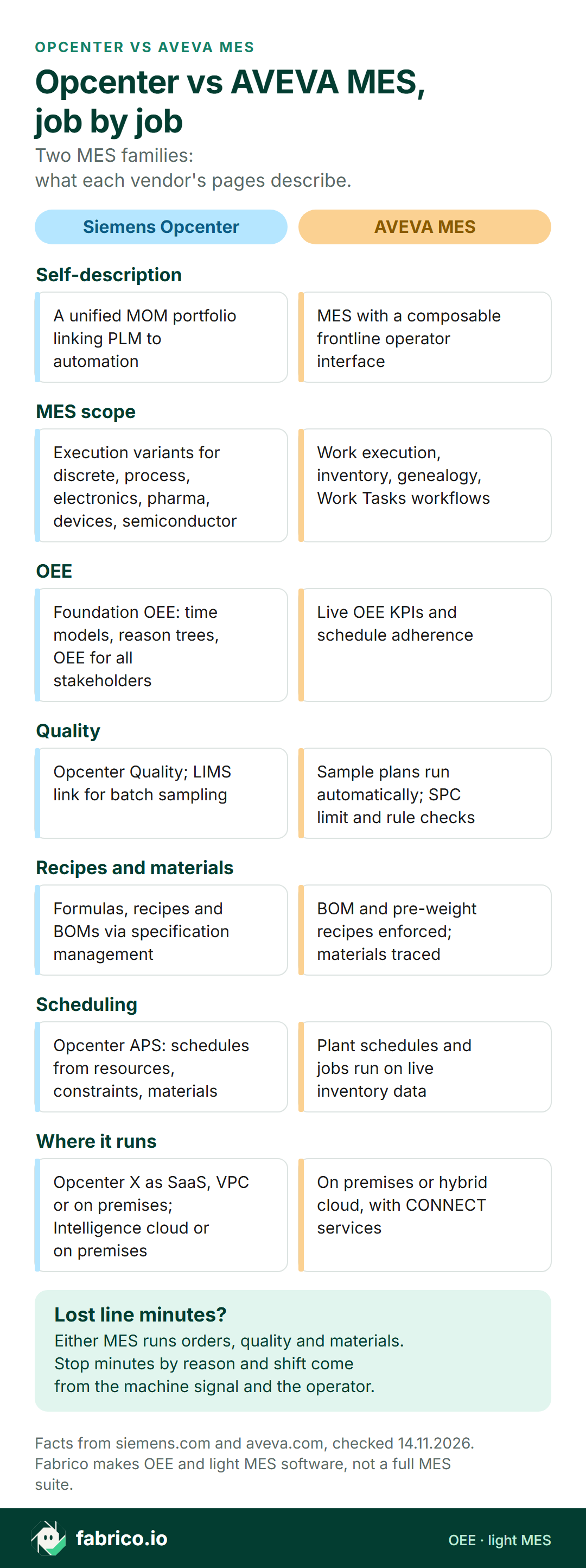
Text version of this infographic
- Self-description. Siemens Opcenter: a unified MOM portfolio linking PLM to automation. AVEVA MES: MES with a composable frontline operator interface.
- MES scope. Opcenter: Execution variants for discrete, process, electronics, pharma, devices, semiconductor. AVEVA: work execution, inventory, genealogy, Work Tasks workflows.
- OEE. Opcenter: Foundation OEE with time models, reason trees, OEE for all stakeholders. AVEVA: live OEE KPIs and schedule adherence.
- Quality. Opcenter: Opcenter Quality; LIMS link for batch sampling. AVEVA: sample plans run automatically; SPC limit and rule checks.
- Recipes and materials. Opcenter: formulas, recipes and BOMs via specification management. AVEVA: BOM and pre-weight recipes enforced; materials traced.
- Scheduling. Opcenter: APS schedules from resources, constraints, materials. AVEVA: plant schedules and jobs run on live inventory data.
- Where it runs. Opcenter: Opcenter X as SaaS, VPC or on premises; Intelligence cloud or on premises. AVEVA: on premises or hybrid cloud, with CONNECT services.
- Lost line minutes? Either MES runs orders, quality and materials. Stop minutes by reason and shift come from the machine signal and the operator.
The standards behind both architectures
An MES sits in the layer that ISA-95 calls Level 3, between business systems and control systems (Siemens names the standard on its Opcenter Intelligence page; see the ISA-95 guide for the levels). The protocols named on their pages are open standards with public specifications, which helps when you write integration requirements:
- OPC UA. The OPC Foundation (accessed 14.11.2026) describes "The OPC Unified Architecture (UA), released in 2008" as "a platform independent service-oriented architecture," and points to more than 150 companion specifications for specific domains. Opcenter X lists OPC UA among its protocols.
- MQTT. The OASIS MQTT Version 5.0 standard (accessed 14.11.2026), dated 07 March 2019, opens: "MQTT is a Client Server publish/subscribe messaging transport protocol." AVEVA's System Platform page and Opcenter X both list MQTT. More on the pair in OPC UA vs MQTT.
- Electronic records. For regulated plants (Opcenter lists Pharma and Medical Device variants), 21 CFR 11.10 at Cornell LII (accessed 14.11.2026) lists among its controls "Protection of records to enable their accurate and ready retrieval throughout the records retention period" and "secure, computer-generated, time-stamped audit trails". For drugs, 21 CFR 211.188 (accessed 14.11.2026) asks that batch records include "A statement of the actual yield and a statement of the percentage of theoretical yield at appropriate phases of processing".
None of these standards makes one product a better fit. They give you shared wording for the requirements document, so both vendors answer the same question.
Decision matrix: Opcenter or AVEVA MES for your plant
Each row pairs a first job with the vendor page that leads on it. Start with that vendor, give the other an identical pilot task, and judge both by the last column. Rows tell you where to begin; they are not scores.
| If this is you | Look first at | Why (vendor page) | Prove it in the pilot by |
|---|---|---|---|
| Recipes and product changes start in an engineering or PLM system | Opcenter | Opcenter page: MOM links PLM to automation | Pushing one changed recipe from engineering to a running order |
| The plant already runs AVEVA System Platform or Wonderware SCADA | AVEVA MES | MES page: native integration for System Platform | Reading one existing System Platform template into an MES work order |
| Discrete assembly with frequent engineering change orders | Opcenter | Execution Discrete: change orders, work orders and materials handled together | Applying one change order to work already in progress |
| Pharma batch records or device history records are in scope | Opcenter first, AVEVA asked the same | Execution page lists Pharma (eBR) and Medical Device (eDHR) variants | One master record executed and reviewed end to end |
| Engineers want to compose operator screens with low code | AVEVA MES | MES page: low-code/no-code workflow and UX modeling | Your engineer adding one check step and releasing it |
| Forms must keep working when Wi-Fi drops in a corner of the plant | AVEVA MES | Work Tasks page: tasks executed on and offline | Completing a task with the network off, then syncing |
| A small or mid-sized firm wants MES as SaaS | Opcenter X | Opcenter X page: modular SaaS for SMBs, also VPC or on premises | One order traced from release to finished goods |
| Lab results gate the release of each batch | Both | Opcenter Process: LIMS for batch sampling; AVEVA MES: automated sample plans | Timing one batch from sample to release on each system |
| Several plants need one KPI view in the cloud | Both | Opcenter Intelligence Cloud; AVEVA MES: multi-site data on CONNECT | Two plants' OEE on one screen with the same definitions |
| Stop minutes and OEE by shift are the first business case | Both, or an OEE layer first | Foundation OEE; AVEVA MES: OEE KPIs in real time | Seven days of stop minutes reconciled with PLC states |
Planning to keep an old MES running while you choose? The replace or upgrade a legacy MES guide covers the order of work.
Where OEE fits beside either MES
An MES answers "was this order made to the recipe, with these materials, and released by the right people?" OEE asks a plainer question: of the planned minutes, how many ran, at what speed, and with how many good bottles or packs at the end? Both Opcenter and AVEVA MES describe OEE functions, and in a full rollout the OEE screens often go live after orders, materials and quality, because they need the machine states mapped first.
That order of work leaves many plants without trusted stop data for the first phase of an MES project, which is exactly when the business case is being tested. A light OEE layer can run first or beside the MES: it takes run, stop and count from the machine signal, asks the operator for the reason, and shows lost minutes by reason and shift. When the MES OEE module arrives, the two can be compared minute for minute, and the plant keeps whichever it trusts. The SCADA vs MES guide explains where machine states usually come from, and the MES vs LIMS guide covers the lab hand-off that shows up in the worked example below.
Where Fabrico fits beside either
Fabrico's product is cloud OEE software plus a light MES, with its functions listed in the MES and OEE overview. Batch and device records, recipe enforcement, LIMS links, finite scheduling and a full MOM suite sit outside what Fabrico does, so it is no substitute for Opcenter or AVEVA MES.
- Machine data. Run, stop and count are read from the machine's controller; where that is impractical, a fitted sensor or counter supplies them. Fabrico reads run, stop and count from the machine's PLC; see the OPC UA and OEE guide.
- Stop reasons. Operators pick why the line stopped on a phone or tablet at the line, and managers see OEE, a downtime Pareto and the euro value of lost minutes for each line and shift.
- Camera add-on. For a station without a usable signal, output there is counted by the camera add-on; a camera that proposes the stop reason is on the Roadmap. Where a camera covers the line, the video for the minute of a stop can be opened from the shift timeline; it is streamed on request and not stored. Details sit on the computer vision add-on page and, for packing halls, in computer vision for FMCG manufacturing.
- Maintenance follow-up. A work order opens from a logged stop in one tap, and you can set chosen stop reasons to create that work order automatically as soon as the reason is logged.
- Data out. A REST API and webhooks feed other systems; Excel and CSV exports serve people who work in spreadsheets.
Beside Opcenter or AVEVA MES: orders, recipes, genealogy and quality stay in the MES, while Fabrico sorts line stoppages by lost minutes and euros. No ready connector to either MES is listed by Fabrico; prove that hand-off in a pilot.
For a sample shift with each stoppage priced, book a demo.
Worked example: lab holds on a hand soap filling line
All figures here are sample data invented for this page, not a real plant or a product screen. A household products plant fills 500 ml liquid hand soap bottles on one line, fed from mixing tanks. The line runs 12 hour shifts of 720 minutes with breaks of 20, 20 and 30 minutes, leaving 650 planned minutes. At an ideal 120 bottles a minute, the filler could make 78,000 bottles in that time.
Before each new bulk batch may be filled, QC must sample it and release it. On this shift the lab result came back late, and the line also changed fragrance and label once.
| Sample data: stop | Minutes |
|---|---|
| Waiting for QC release of the next bulk batch | 44 |
| Changeover: fragrance and label | 46 |
| Capper jams | 21 |
| Bottle unscrambler starved | 16 |
| Label reel change | 11 |
| Total stopped | 138 |
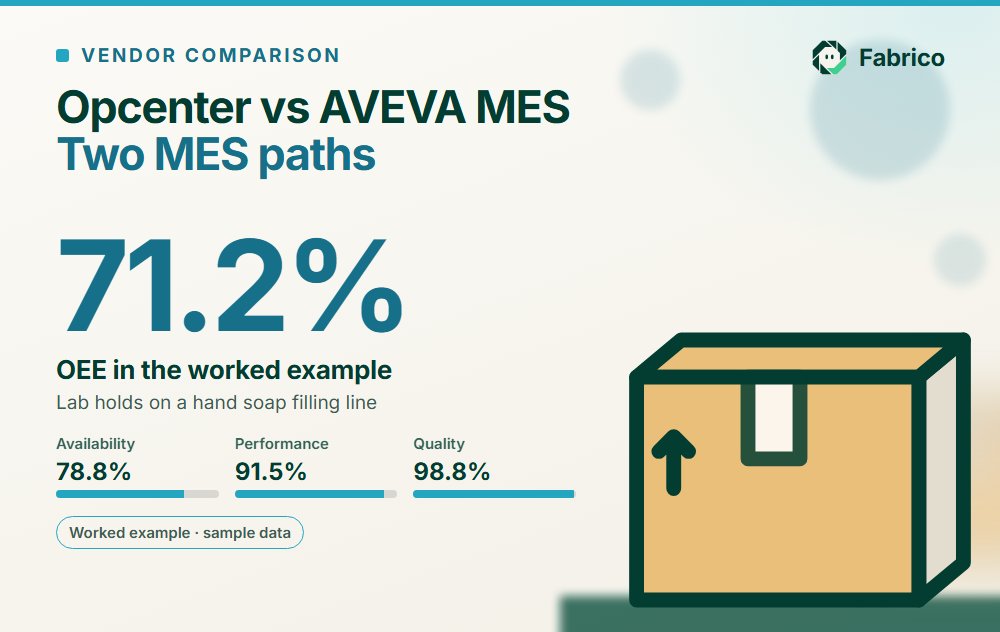
Step 1, OEE. The line stood still for 138 minutes, so it ran for 512 minutes and availability is 512 / 650 = 78.8%. In 512 minutes the ideal is 61,440 bottles; the line made 56,200, so performance is 56,200 / 61,440 = 91.5%. The plant's own checkweigher rejected 700 bottles, leaving 55,500 good, so quality is 55,500 / 56,200 = 98.8%. OEE is 78.8% x 91.5% x 98.8% = 71.2%, the same as 55,500 good bottles out of 78,000 possible (the OEE calculation guide shows the method).
Step 2, the lab wait in euros. Each minute the filler runs turns out about 108.4 good bottles (55,500 / 512) at this shift's speed and rejects. The 44 minute QC wait alone is about 4,770 good bottles. At a sample contribution margin of EUR 0.35 a bottle, that is about EUR 1,670 a shift.
Step 3, what an MES could be worth here. Suppose sampling is triggered earlier and lab results reach the line electronically, so the QC wait falls from 44 to 14 minutes, and recipe and label checks at changeover take the changeover from 46 to 34 minutes. These two targets are working assumptions for the pilot and come from no vendor. Run time rises by 42 minutes to 554, availability to 85.2%, and good output by about 4,553 bottles to 60,053, so OEE comes to about 77.0%. The gain is about EUR 1,594 a shift at EUR 0.35 a bottle.
Step 4, a month and a year. Assume two 12 hour shifts a day and 21 production days a month. That is 42 shifts each month and 504 in a year, worth about 191,226 bottles and EUR 66,929 monthly, or about 2,294,712 bottles and EUR 803,149 yearly. Halve the improvement and the euros halve with it; change the margin and they move by the same ratio. Replace the sample margin and shifts with your own before the figures travel.
Agree the changeover rule. Whether changeovers count as planned or unplanned downtime changes availability. Pick one convention before the baseline and hold it through the pilot; otherwise the two periods cannot be compared. For snack and food lines with similar holds, see MES for snack food manufacturing.
Questions to ask Siemens and AVEVA
Send both vendors the same recipe, the same five machines and the same sample shift, then ask:
- Which exact product, modules and version are you proposing, and which of them does the quote rest on?
- How do our five key machines connect, through which protocol or layer, and who builds that connection?
- How is a short stop classed in your OEE module, who enters the reason, and how is unclassified time shown?
- When a lab result is out of limit, where does the batch hold appear and who releases it?
- Where does each part run (plant edge, private cloud, your SaaS), and what still works when the internet link is down?
- Which reference plant matches our process type and runs the product you are proposing, and may we speak to its production manager?
- After go-live, who edits a recipe, a screen or a reason code, and which course must that person complete first?
What to do this month
- Name the products. Ask each vendor for the exact product, modules and version in writing, so every later comparison is between two real offers, not two brands.
- Log the holds. For ten shifts, record each minute a line waits for lab release, a recipe check or a changeover sign-off, using PLC states where you have them and a clipboard where you don't.
- Turn minutes into euros. Good units per run minute times your contribution margin, the same steps as the soap line above, gives a figure for each shift and each year.
- Draw the architecture. Put both proposals on one page: where execution runs, how machines connect, how the ERP link works, and what IT must host.
- Book matching pilots. Same line, same recipe, same exception cases, and the same success measures: release wait, changeover minutes and stop minutes with a reason.
What people ask next
Which is better, Siemens Opcenter or AVEVA MES?
Neither is better in general. Siemens describes Opcenter as a MOM portfolio that links engineering data in PLM to automation, with MES variants per industry. AVEVA describes its MES as a composable, hybrid cloud product built around the operator interface and System Platform. Start with the vendor whose own pages lead with your first job, then put the other through an identical pilot.
What do Siemens vs AVEVA reviews actually compare?
Mostly brands. Both companies sell far more than MES, so a review may cover Opcenter Execution, Opcenter X, AVEVA MES, System Platform or an HMI. Keep the reviews that name the product and version you are evaluating and come from your plant type, and treat project complaints as partly about the integrator and scope.
Does Siemens Opcenter calculate OEE?
Yes, per Siemens. Opcenter Execution Foundation OEE calculates OEE and makes it visible to all stakeholders, with time models, reason trees and state transition calendars configured by engineers, and it supports Opcenter Execution Discrete and Process. Opcenter Intelligence adds KPI dashboards with real-time visibility into current downtime causes.
Does AVEVA MES measure OEE?
Yes, per AVEVA. Its MES page lists OEE KPIs and schedule adherence, monitored live, and quick response to events to minimize downtime. Ask how machine states reach the MES, typically through System Platform, and who records the reason for each stoppage.
Can Opcenter or AVEVA MES run in the cloud?
Both have cloud options. Siemens offers Opcenter X as SaaS, with VPC and on-premises options, and Opcenter Intelligence in cloud and on-premises editions. AVEVA MES can be installed on premises or used in a hybrid model, where execution stays on the plant edge and multi-site services sit on CONNECT.
Can Fabrico run beside Opcenter or AVEVA MES?
Yes. Fabrico works as an OEE layer next to the MES: the machine's PLC, or a fitted sensor or counter, gives run, stop and count; operators pick the stop reason on a phone or tablet; data goes out by REST API, webhooks or Excel and CSV export. No ready connector to either MES is listed by Fabrico, so test the hand-off in a pilot first.
Want to see lost line minutes sorted by reason and priced in euros, with either MES left in place? Book a demo.
Related articles

Latest from our blog


Real Fabrico tiles, sample data.