


 Login
 Blog
Computer Vision for Meat and Poultry Processing: Beyond Grading

In short: computer vision for meat and poultry processing usually means grading and inspection. The OEE job is different: cameras that count trays, packs and cases on the lines after primary processing, so you can see where output goes missing.
- Grading, x-ray and label systems check the product. They do not tell you why the tray line packed less than planned.
- The losses hide after primary processing: portioning, boning, manual tray loading, tray sealers, labellers, checkweighers and case packing.
- Use the machine signal where there is one, and a camera where people do the work. The operator adds the stop reason.
- Many people work at these stations. Aim cameras at the product, report by station, and talk to the works council or union first.
- Fabrico counts output with AI cameras (an add-on) next to PLC data. It does not grade or inspect meat.
Ask a meat or poultry plant about machine vision and the answer is usually grading and inspection: carcass classification, bone detection, x-ray for foreign bodies and label checks.
They earn their place in yield and food safety. Keep them.
This page is about the second job: counting output on the lines after primary processing. That is where trays are loaded by hand, sealers wait for product and short stops go unlogged.
We sell Fabrico, so test what we say here like any vendor's claims.
Computer vision for meat and poultry processing: two different jobs
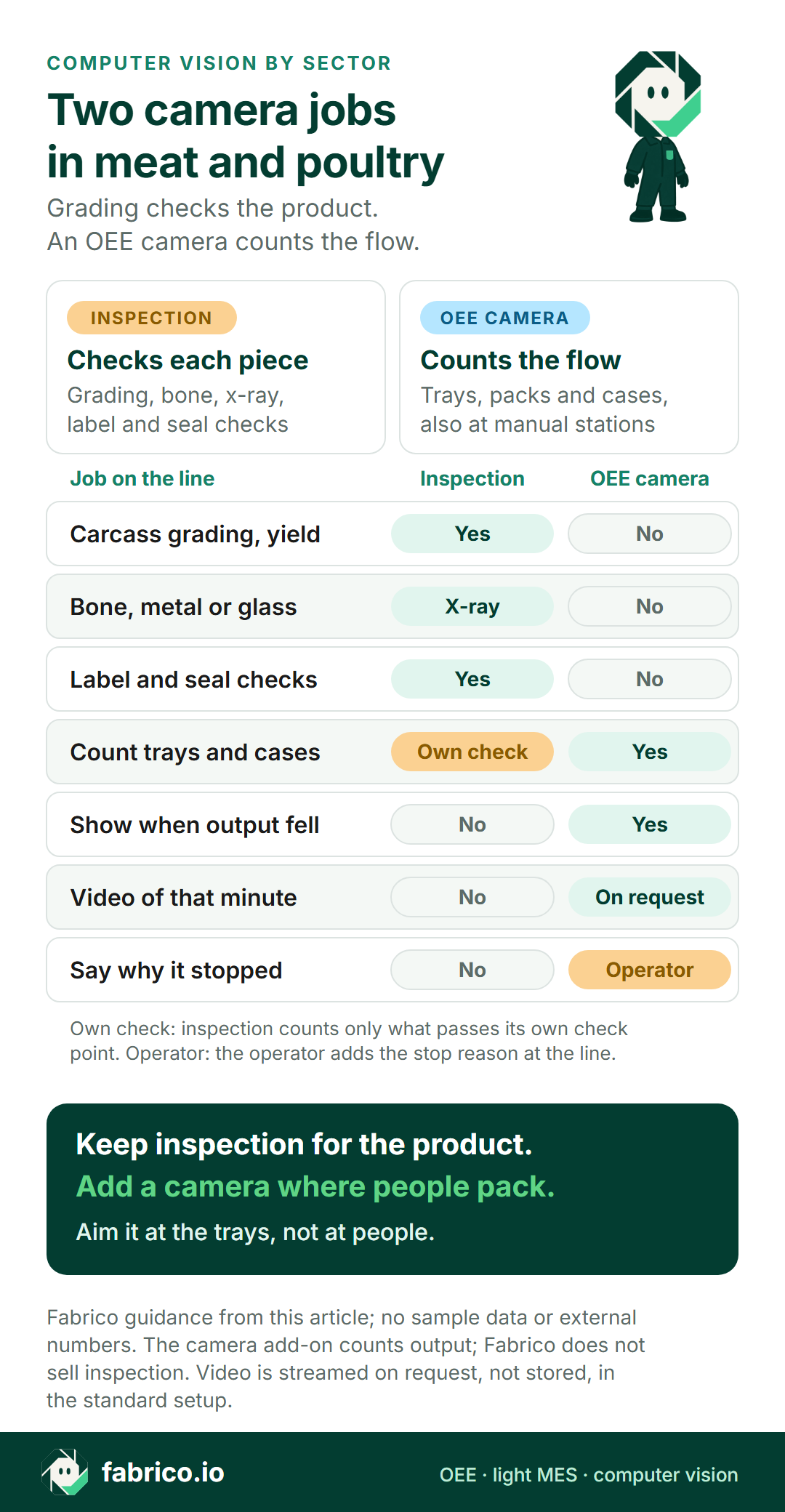
An inspection camera looks at each piece and decides if it passes. An OEE camera looks at the flow and counts what leaves a station.
| Job | Inspection vision | OEE camera |
|---|---|---|
| Carcass grading, fat and yield | Yes, its main job | No |
| Bone, metal or glass in product | X-ray and detectors | No |
| Label, date and code checks | Yes | No |
| Seal checks on trays | Yes, where fitted | No |
| Count trays, packs and cases | Only at its own check point | Yes, also at manual stations |
| Show when output fell | No | Yes, in the count |
| Video of the minute a line slowed | No | Yes, opened on request |
| Say why the line stopped | No | No. The operator adds the reason. |
Grading and bone detection come from meat equipment makers, label and code checks from vision makers such as Cognex, and x-ray systems and checkweighers from makers such as Mettler-Toledo and Ishida. Fabrico does not sell inspection.
If the x-ray, metal detector or checkweigher sends a reject signal, that count can feed the quality rate of the line's OEE. See label and code checks vs OEE cameras.
Where meat and poultry lines lose output after primary processing
The pace is set at the kill line, in birds per minute on a poultry line and head per hour on a red meat line. Under the US poultry line speed rule, 9 CFR 381.69, the maximum for young chicken plants under the New Poultry Inspection System is 140 birds per minute, and 55 for turkey.
Many plants already run faster. FSIS says 44 plants under that system held waivers in 2024 to run at up to 175 birds per minute. In February 2026, FSIS proposed raising the limits to 175 for young chicken and 60 for turkey. Comments closed on 20 April 2026, and no final rule had been published by November 2026, so check the status before you plan around it.
FSIS checks that speed at the point of inspection. The packing hall still has to clear what comes in, and going from 140 to 175 birds per minute is 25% more birds. Each packing machine has its own rated speed, and that is the speed OEE should use, not the bird rate.
Here is where the minutes usually go in secondary processing and packing.
- Portioning and slicing: blade changes, belt clean-downs and weight drift. The cutter has a PLC count, but in portions, not trays.
- Red meat boning and slicing: boners at manual tables fill crates with primals and trim, and sliced ham or bacon runs to a thermoformer. If each crate is weighed and labelled, use that signal. If not, a camera over the crate outfeed counts it.
- Manual tray loading: a row of people place portions into trays by hand. There is no machine signal, so gaps here look like a slow sealer.
- Tray sealers, MAP packers and thermoformers: film changes, seal faults, tray jams and tool changes. See tray sealer OEE.
- Labellers: reel changes, printer faults and wrong labels. See labeller OEE.
- Checkweigher and metal detector: rejects belong in quality, but giveaway does not show in OEE. See checkweigher rejects and OEE.
- Case packing: often by hand into cases or crates. See case packer OEE for the automatic version.
- Sanitation and changeovers: a daily full wash-down, plus species and allergen cleans. Decide once whether they sit inside planned time, as our sanitation shift guide explains.
For yield, giveaway and the plant-wide view, read our OEE guide for meat and poultry plants.
Where a camera goes on a poultry tray line
Most machines on a tray line already have a usable signal. The gaps are where people do the work.
Two stations get a camera in this layout: the outfeed of the manual tray loading belt, and the outfeed of manual case packing. Each camera looks down at one spot where every finished tray or case passes once.
The machines keep their PLC or sensor signal. Our page on OEE for a manual packing station covers the counting rules.
Privacy at stations full of people
Meat and poultry processing employs more people than any other part of food manufacturing. In the US, meat processing employed 30.6 percent of food and beverage manufacturing workers in 2021, the largest share, according to the USDA Economic Research Service.
So a camera at a loading belt will have people near it.
In Germany, the works council co-determines "the introduction and use of technical devices designed to monitor the behaviour or performance of the employees", under section 87 of the Works Constitution Act. Plan on a line camera being in scope, even if you only mean it to count trays.
- Write down what the count is not for. On a meat line, a camera at the loading belt will be read as a speed-up tool. Agree in writing that counts are not used for individual targets or discipline.
- Aim at the product. Point the camera at the tray outfeed, not at the people loading the trays.
- Report by station, never by person. OEE by station, line and shift, and no screen that ranks operators.
- Limit the video. In Fabrico's standard setup, video is streamed on request, not stored. Agree in writing who may open it, and why.
- Tell people first. Show the crew the picture before the camera goes live.
- Bring the works council or union in early. Before the purchase, not after. Our works council guide has the sequence.
Under GDPR, a line camera that can show people needs a clear purpose and may need an impact assessment. See GDPR and production line cameras, and our wider take on cameras without surveillance.
Roadmap: automatic masking of people in the picture is planned, not live today. Until then, the protection is framing, station-level reports and streamed video.
Camera, signal or operator: station by station
Pick the source per station, not per plant. This is the usual picture, with a red meat boning line added. The general rule is in camera or sensor for OEE.
| Station | Count from | Watch for |
|---|---|---|
| Portion cutter, slicer | PLC or counter | Portions vs trays: agree the unit |
| Boning line, crate outfeed | Crate scale or camera | Count crates, not pieces |
| Manual tray loading | Camera | People nearby: aim at the trays |
| Tray sealer, thermoformer | PLC signal | Cycles vs trays: count empty cavities |
| Weigh-price labeller | PLC signal | Label rejects go to quality |
| Checkweigher, metal detector | Reject signal | Giveaway is not an OEE loss |
| Manual case packing | Camera | Count cases, convert to trays |
| Stop reasons | Operator | A short list, on a tablet at the line |
Bring your station list to a demo and ask us to mark which stations need a camera and which already have a usable signal.
Worked example: one shift on a fresh poultry tray line
This is a sample line with illustrative numbers that describe no plant. Chicken fillet portions are loaded into trays by hand, sealed under modified atmosphere, labelled, checked and packed into cases.
- Planned time: a 480-minute shift minus 30 minutes of breaks and a 30-minute planned clean-down, so 420 minutes.
- Ideal rate: the sealer's rated speed, 40 trays a minute. So 420 minutes could make 16,800 trays.
- Stops: the sealer's PLC logged 35 minutes of film changes, seal faults and tray jams.
- Count: 13,860 trays left the sealer.
- Rejects: the checkweigher and metal detector rejected 277, so 13,583 were good.
- Availability = 385 run minutes / 420 planned = 91.7%.
- Performance = 13,860 trays / 15,400 possible in 385 minutes = 90.0%.
- Quality = 13,583 good / 13,860 counted = 98.0%.
- OEE = 91.7% x 90.0% x 98.0% = 80.9%. Check: 13,583 good / 16,800 possible = 80.9%.
This plant keeps its clean-down outside planned time. If yours counts it as a loss, planned time is 450 minutes and OEE is 13,583 / 18,000 = 75.5%.
Now the part the sealer's signal cannot show. Performance lost the equivalent of 38.5 minutes: 385 run minutes minus the 346.5 minutes that 13,860 trays take at 40 a minute. During those gaps the sealer stayed in auto, waiting for trays, so its signal logged no stop.
The camera at the loading belt showed when the trays thinned out. For the longer gaps, the operators opened the video and added the reasons:
- Portion belt empty after the cutter's blade changes: 14.0 minutes, or 560 trays.
- Empty tray stock ran out at the loading belt: 10.0 minutes, or 400 trays.
The other 14.5 minutes, or 580 trays, were gaps of under a minute spread across the shift. They show in the count as slow running.
So 24 of the 38.5 lost minutes started before the sealer. The cutter's PLC logged its blade changes, but only the count at the loading belt shows how long the sealer waited for them. Without it, this shift looks like a slow sealer, and maintenance gets sent to the wrong machine.
At an example margin of 0.40 EUR a tray, the 960 trays lost to supply gaps cost 384 EUR in one shift. The full method is in our OEE calculation guide.
Cold, wet and washed down: what the cameras need
Cutting rooms are cold by design. EU hygiene law requires red meat to be kept at not more than 7 °C (3 °C for offal) during cutting, slicing and packaging, "by means of an ambient temperature of not more than 12 °C or an alternative system having an equivalent effect". For poultry meat the limit is 4 °C. Both rules allow cutting before the meat is that cold in set cases. Source: Regulation (EC) No 853/2004, Annex III, Chapter V of Sections I and II.
Daily wash-down with water, foam and chemicals does the rest, and cold air next to warm water fogs a lens.
- Housing: use one made for wash-down, and check it against your water pressure, temperature and chemicals with the supplier. Our note on IP69K ratings explains what the rating covers.
- Mounting: rigid, above the belt and out of the hose path.
- Start-up: put the lens in the sanitation sign-off: dry, clear and aimed before the first tray.
- Fog: expect it where cold and warm air meet, and right after sanitation. Our page on cameras in a frozen food packing hall covers the fixes.
If the night sanitation shift sits outside planned time, a camera that sees no trays during the clean is not counted as a loss.
Eight questions for any vendor
Ask every vendor the same questions. Bring one real shift from your tray line as the test case.
| Ask | How to test the answer |
|---|---|
| Do camera counts and PLC data share one timeline? | Ask to see a manual station and a sealer side by side. |
| Can each station count its own unit? | Portions, trays and cases differ. Ask how the line converts them. |
| How is the sanitation shift handled? | Inside or outside planned time? Check that its hours still show. |
| What happens to the cameras during wash-down? | Ask who specifies the housing for your water, heat and chemicals, and who checks the lens before start-up. |
| Is video kept, and who can open it? | Get the default in writing: streamed or recorded, for how long, and who has access. |
| Can OEE be reported without naming people? | Check that no screen ranks operators. |
| How do we test the count? | Run a hand count against the camera on your own trays, with wet film, stacked trays and a tray format change. Ask what setup a new tray size needs, and who does it. |
| How do x-ray and checkweigher rejects reach quality? | Ask which reject signal feeds the count, and where giveaway is reported. |
For a side-by-side of tools for food plants, see food OEE software: 4 tools compared.
How Fabrico does it
Fabrico is a cloud OEE and light MES platform.
- Stops and counts: from the machine signal, a PLC, sensor or counter.
- Stop reasons: the operator adds them at the line, on a tablet or phone.
- OEE and losses: OEE and downtime by line and shift, with losses shown in money. On the web, iOS and Android.
- Cameras (add-on, on request): AI cameras count output at manual tray loading, case packing or any machine with no usable signal. You can open the camera video for any moment on the shift timeline. In the standard setup, video is streamed on request, not stored in Fabrico.
- Your data: it leaves through a REST API, webhooks and Excel or CSV export.
Roadmap, not live today: a camera that detects stops by itself, a camera that suggests a stop reason for the operator to confirm, and automatic masking that keeps people out of the picture.
What Fabrico does not do: grading, bone or foreign body detection, label and code checks, or seal inspection. Their reject signal can feed the quality part of OEE. For production planning, ask us in the demo.
Run the eight questions above on us too. See the computer vision OEE and MES page, or how to judge OEE software in general.
Book a demo and bring your station list.
What people ask next
Can one camera grade meat and count output?
Not well. Grading needs controlled light and a close view of each piece. Counting needs a steady view of the flow at one spot.
Do cameras work in cold, wet cutting rooms?
Yes, if the camera and its housing are made for it. Check the temperature range, wash-down pressure and chemicals with the supplier, then test the view in the first hour after sanitation, when fog is most likely.
How accurate is a camera count of trays?
Test it on your own trays against a hand count, over full shifts. Include wet film, stacked trays and a changeover. Our guide on how accurate a camera count is shows the test.
Does the camera tell us why the line stopped?
Not today. The count shows when output stopped or slowed, and the video shows what happened. The operator adds the reason.
A camera that suggests a reason for the operator to confirm is on our roadmap.
Will the works council or union accept a camera at the loading belt?
It depends on the agreement you reach. Aim the camera at the product, report by station, limit who can open the video, and agree that counts are not used for individual targets. Bring them in before you buy, not after.
What drives the cost?
Prices are not public, ours included. A quote depends on the number of lines, the stations that need a camera, mounting in wash-down areas, the network and training. Give every vendor the same line list.
How do we start?
Start with one line and one manual station, with a baseline and a decision date agreed first. Our computer vision OEE pilot guide has a plan.
Want to see camera counts next to your sealer's signal? Book a demo.
Related articles







Real Fabrico tiles, sample data.