


 Login
 Blog
Line Management System From the Line Builder vs OEE Software

In short: A line management system from the line builder is often enough for one line from one builder; a plant-wide OEE software layer wins once you run lines from several builders, have manual stations, or need numbers you can compare across lines.
- The builder's package knows its own machines best: states, alarms, speeds.
- OEE software applies one definition to every line, whoever built it.
- The two often run side by side, linked by an open interface such as PackML.
- Before you sign, ask for the formula, the open tags and who owns the data.
The quote for a new filler or a full packaging line often comes with a line management system or a line monitoring package from the same builder. It shows the line's states, alarms and speeds, and often a line efficiency or OEE figure. The question is whether that is all the plant needs, or whether an independent OEE layer should sit above it.
This guide is for the plant manager, CI lead or engineering manager who has that quote on the desk. For whom to hire for the line itself, see machine builders vs systems integrators. For control screens vs OEE software, see OEE software vs SCADA. This page covers the monitoring package that comes with the line.
We sell Fabrico, OEE and light MES software, so we sit on one side of this choice. Test what we say here like any vendor's claims.
Line management system vs OEE software: what each is built to do
A builder's line package is designed around the builder's machines. Packages differ from builder to builder, so read this as a description of the category, and check each quote on its own. OEE software is designed around the plant: one definition, many sources.
| Job | Builder's line package | Plant-wide OEE software |
|---|---|---|
| Machine states and alarms | Deep, built for its machines | Reads states from the signal |
| Line efficiency or OEE | Often included; formula varies | One plant formula for all lines |
| Stop reasons | Ask who edits the reason list | Plant's list, tagged by operators |
| Machines from other builders | Ask what it can read | Built to read many sources |
| Losses across lines | Ask if it covers other lines | Compared side by side |
Neither column is better in general. The builder's package goes deeper into its own machines. OEE software goes wider across the plant. The right answer depends on how many lines you run, who built them and who needs the numbers.
When the line builder's package is enough
The package can be all you need when these are true:
- One main line, one builder. The line is the plant's bottleneck, and the machines on it come from one supplier or are integrated by them.
- No comparison needed. Nobody has to set this line's OEE next to another line's, in this plant or in the group.
- Its stop reasons work for the team. The reason list covers the losses your team actually fights, including waiting, staffing and changeovers.
- The data can leave. The package exports raw stops and counts in a format your team can use.
- The formula is written down. You know what the figure counts and what it leaves out.
In that case, a second system adds work without adding much. Spend the effort on using the package well: daily reviews of the top losses, clear stop reasons and a fixed ideal rate.
When a plant-wide OEE layer wins
The picture changes as the plant grows around that first line.
- Mixed builders. A filler from one builder, a case packer from another, a palletiser from a third. Each package, if there is one, may use its own formula. Ask each builder for theirs. See filler OEE on a bottling line for why the pace-setting machine matters.
- Manual and older stations. Hand-pack tables, bagging stations and older machines may have no machine signal at all. Ask whether the line package can read them; they still lose time. See camera or sensor for OEE, by machine for how to get a count from each.
- Numbers you can compare. Once a manager ranks lines, the definitions must match. Otherwise the ranking reflects the formulas, not the lines. The worked example below shows how big that gap can be.
- Stop reasons from the floor. Many losses are not machine faults: waiting for material, a missing operator, a slow changeover. Operators know these causes. Ask whether the package lets them tag them.
- Data ownership and exit. If the data lives in one builder's system, ask how it leaves. Our OEE data exit plan lists the questions.
- Several sites. A group report needs the same OEE in every plant. See single-plant vs multi-site OEE.
Decision framework: package, OEE layer, or both
Pick the builder's package if you run one main automated line from one builder, nobody compares it with other lines, and its formula and export meet your needs.
Pick a plant-wide OEE layer if you run lines or machines from several builders, have manual stations, or report OEE across lines or plants.
Run both if the new line comes with a strong package and the rest of the plant needs one definition. The package stays the engineers' tool for the machines. The OEE layer becomes the plant's shared number.
| Situation | Builder's package | Plant-wide OEE layer |
|---|---|---|
| One line, one builder | Often enough | Optional, for a second view |
| Several lines, mixed builders | Ask if one formula covers all lines | One definition across lines |
| Manual or older stations | Ask which stations it can read | Sensors or camera counts |
| Group or multi-site reports | Ask if it reports across lines and plants | Lines and plants side by side |
Want a second view on the builder's monitoring scope before you sign? Book a demo and bring the OEM quote.
How the two can coexist: open interfaces
Running both does not need double wiring if the line exposes its data in a standard way. Two standards come up often on packaging and food lines.
- PackML. OMAC describes PackML as "the automation standard that makes it easier to transfer and retrieve consistent machine data", with consistent behaviour "even if they come from different manufacturers and use different control systems". The OPC UA for PackML specification (OPC 30050) notes that lines are built from equipment "often from multiple suppliers, usually each with its own specific and custom interface". It lists "Overall Equipment Effectiveness (OEE) data" among what PackML provides, and aims to "provide consistent tag structure for connection to plant MES and enterprise systems". Our PackML state model guide has the detail.
- Weihenstephan Standards. The Weihenstephan Standards "define a communication interface for the standardized transmission of machine data to higher-level IT systems". Their site lists domains for beverage filling and packaging, food, bakery and confectionery machines and brewery process areas, and names "manufacturer and control system-independent implementation" among the advantages.
In practice, the pattern looks like this. The builder's package reads its machines in depth, for diagnostics and service. The same machine states and counts are exposed through the agreed interface. The plant's OEE layer reads them, adds stop reasons from operators and signals from other machines, and applies one definition. Agree in the contract which tags are exposed, from which machines and in which standard. Where a machine has neither, its screen or a sensor can still give a signal; see HMI data collection for OEE.
Worked example: two builders, two definitions
Illustrative, sample data, not a customer. A plant runs two packaging lines from two different builders. Both work one 480-minute shift with no planned breaks in this example. Both have an ideal rate of 100 packs a minute at the machine that sets the pace.
- Line A: stops of 90 minutes: machine faults 40, a changeover 30, starvation from upstream 20. Output 36,000 packs, 35,280 good, 720 rejects. Its package shows a "line efficiency" that leaves out changeovers and starvation.
- Line B: stops of 70 minutes: machine faults 35, a changeover 35. Output 39,000 packs, 38,220 good, 780 rejects. Its package shows OEE on full planned time.
Line A on its package. Changeover and starvation come out of the time base: 480 minus 50 = 430 minutes. Figure = 35,280 good / (430 x 100 = 43,000) = 82.0%.
Line A on the plant definition. Run time = 480 minus 90 = 390 minutes. Availability = 390 / 480 = 81.3%. Performance = 36,000 / (390 x 100 = 39,000) = 92.3%. Quality = 35,280 / 36,000 = 98.0%. OEE = 81.3% x 92.3% x 98.0% = 73.5%. Check: 35,280 / (480 x 100 = 48,000) = 73.5%.
Line B on the plant definition. Run time = 480 minus 70 = 410 minutes. Availability = 410 / 480 = 85.4%. Performance = 39,000 / (410 x 100 = 41,000) = 95.1%. Quality = 38,220 / 39,000 = 98.0%. OEE = 85.4% x 95.1% x 98.0% = 79.6%. Check: 38,220 / 48,000 = 79.6%. Its package uses the same base, so it also shows 79.6%.
The screens say Line A leads, 82.0% to 79.6%. On one definition, Line B leads, 79.6% to 73.5%. Each loss is counted once in each figure, and neither package is wrong by its own formula. The 50 minutes left out on Line A are the difference. On Line A alone, that is an 8.5-point gap (82.0 vs 73.5). The same exclusions decide whether a new line passes its acceptance test; see OEE guarantees for a new line. That is the case for one plant definition whenever lines are compared. For the formula itself, see our OEE calculation guide.
Checklist for the OEM quote
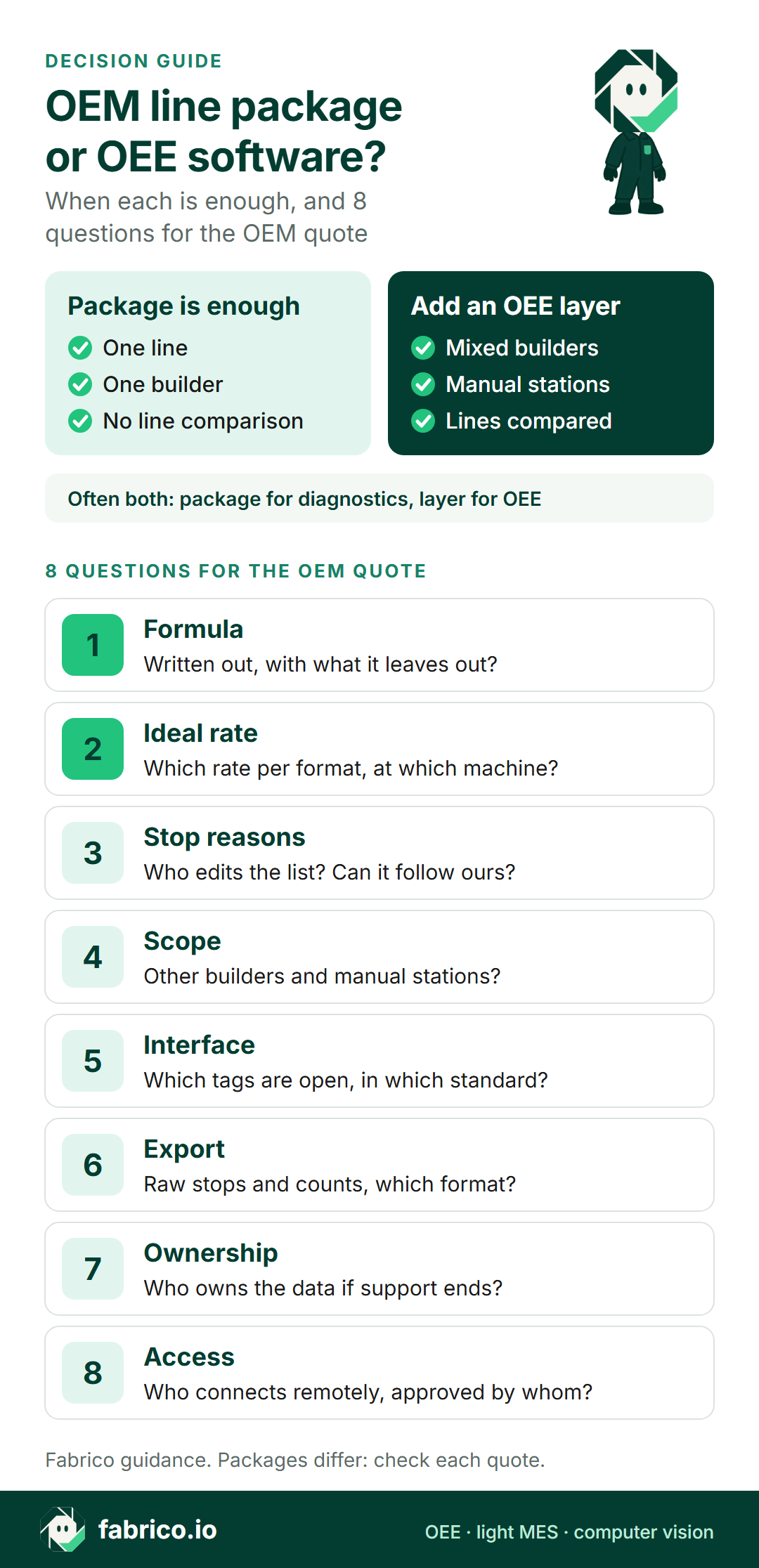
Put these questions to the line builder before the order, and to your own team. They apply to any builder and any package, including a package you decide to keep on its own.
| Check | Question for the line builder |
|---|---|
| 1. Formula | Is the OEE or efficiency formula written out, with what it leaves out? |
| 2. Ideal rate | Which rate per format, set at which machine? |
| 3. Stop reasons | Who edits the reason list, and can it follow the plant's list? |
| 4. Scope | Which machines does it read, including other builders and manual stations? |
| 5. Interface | Which tags are open to other systems, and in which standard? |
| 6. Export | Can raw stops and counts be exported, in which format and how often? |
| 7. Ownership | Who owns the data, and what happens to it if support ends? |
| 8. Access | Who connects to the line remotely, by which route, approved by whom? |
If you are comparing monitoring tools as well, our guides to machine monitoring software, OEE software and MES for beverage manufacturing list what to look at.
Where Fabrico fits
Fabrico is a cloud OEE software and light MES platform. It is the plant-wide layer in this guide, not the builder's package. It can run next to a builder's line management system.
- Data source: on automated lines, Fabrico reads cycles, stops and output from the line's PLC. On older or semi-automated machines, a Fabrico IoT device with external sensors collects the production signal.
- One calculation: every source feeds the same OEE calculation, so lines connected in different ways can be compared side by side, and plants can be set side by side on one screen.
- Stops: micro-stops are detected from the machine signal, and operators tag stop causes on a tablet or phone.
- Losses: OEE is split into availability, performance and quality, updated while the line runs, with losses shown in money.
- Data out: any list exports to Excel or CSV, and a REST API and webhooks connect other systems.
- Camera add-on: at hand-pack tables and older machines with no usable signal, the AI camera add-on counts output. From the shift timeline you can open the camera video for a stop at a camera station. In the standard setup, video is streamed when someone opens it and is not stored in Fabrico.
- Timing: Devices connected in about a month; full rollout in 3 to 4 months.
Roadmap, not live today: stop-reason suggestions from the camera add-on, which the operator confirms.
Not included: Fabrico does not sell quality inspection. Inspection systems that check packs for defects are a different job; their reject counts can feed the quality part of OEE.
Ask in the demo: how Fabrico would read the PackML or Weihenstephan tags a line builder exposes, and how a builder's package and Fabrico would split the work on a mixed line.
See light MES and OEE in Fabrico, the computer vision add-on for OEE and computer vision for FMCG manufacturing. The eight questions above apply to us too.
What people ask next
Is a line builder's line management system the same as OEE software?
They overlap. A line management system from the line builder is built around that builder's machines and line: states, alarms, speeds and often a line efficiency or OEE figure. Plant-wide OEE software is built to apply one OEE definition to many lines and machines, from different builders, with stop reasons from operators and losses compared across lines.
When is the line builder's package enough?
When the plant has one main automated line from one builder, nobody needs to compare it with other lines, and the package's formula, stop reasons and data export meet your needs. Ask for the formula in writing either way.
Why do two lines' OEE figures not compare?
Usually because the definitions differ: which time counts as planned, whether changeovers or starvation are left out, and which ideal rate is used. Put both lines on one written definition before you compare them.
Can a line management system and OEE software run side by side?
Yes, and that is common. The builder's package keeps the machine diagnostics. The OEE layer reads the same states and counts through an open interface, such as PackML tags or a Weihenstephan Standards interface, and applies the plant's own definition.
What should the OEM quote say about data?
Which tags and data are open to other systems and in which interface, how raw stop and count data can be exported, who owns the data, and what happens to it if the support contract ends.
What about manual stations next to an automated line?
A hand-pack table or an older machine may have no machine signal, so ask the builder whether its package can read it. An IoT device with sensors, or a camera that counts output, can put those stations on the same OEE as the automated machines.
Want to see one OEE definition across lines from different builders? Book a demo and bring your station list.
Related articles





Real Fabrico tiles, sample data.